> For the complete documentation index, see [llms.txt](https://docs.platform9.com/llms.txt). Markdown versions of documentation pages are available by appending `.md` to page URLs; this page is available as [Markdown](https://docs.platform9.com/private-cloud-director/virtualized-clusters/virtualmachine/vm-flavors.md).
# VM Flavors
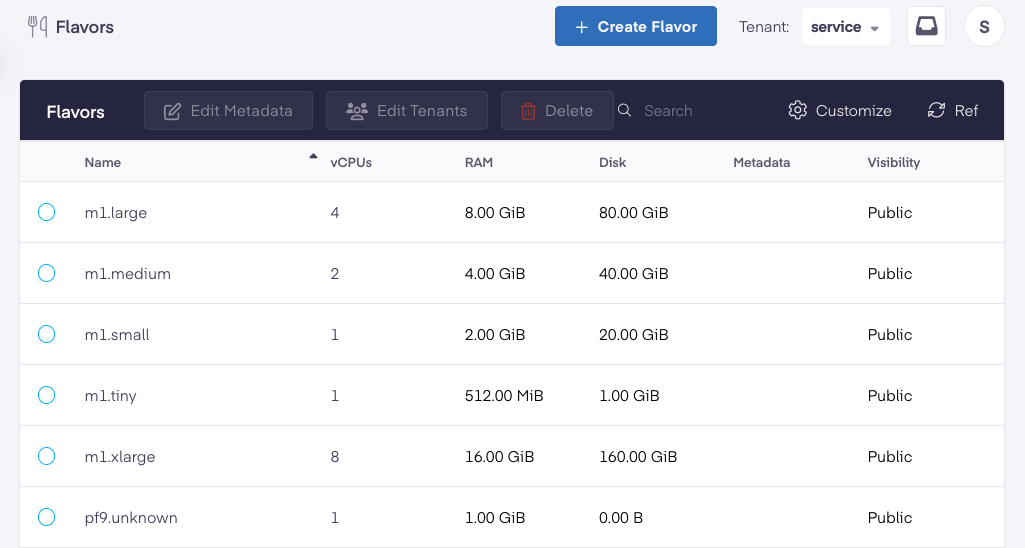
space.vars.product\_name uses t-shirt sized configurations of resource allocations, called flavors, to allow you to specify the resource allocation for VMs. This feature enables administrators to templatize and standardize on a few different VM configurations that developers can use, rather than having a configuration sprawl.
space.vars.product\_name ships with a set of flavors out of box, but administrators can create new flavors and make them available to end users.
## Flavor Properties
Flavors capture the following configuration information for a VM:
1. vCPUs - number of CPU cores
2. RAM - amount of memory
3. Disk - size of the VM ephemeral disk, **only used when** creating a VM from an image or a [VM Ephemeral Disk Snapshot](/private-cloud-director/virtualized-clusters/virtualmachine/virtual-machine-snapshot.md#type-1---vm-ephemeral-disk-snapshot). Ignored when creating a VM using a volume for root disk.
4. Metadata - used to define:
1. What [Host Aggregate](/private-cloud-director/virtualized-clusters/host-aggregate.md) the VM should get placed on, if any, by specifying metadata (key-value pairs) that correspond to a specific [Host Aggregate](/private-cloud-director/virtualized-clusters/add-hosts-virtualized-cluster.md#host-aggregates). When creating a VM using this flavor, the VM will be placed on hosts in your virtualized cluster that are part the selected host aggregate (that match the specified metadata attributes).
## Create Flavors
Navigate to the Flavors menu in the UI under Virtual Machines, and create or edit flavors to suit your desired CPU, memory and disk configuration.
## Zero CPU or Memory Flavors
space.vars.product\_name allows you to create flavorless VMs where you specify CPU and memory information dynamically at VM creation time, instead of having to use a pre-define value via a flavor. This is done by using special flavors that have both CPU and memory set to zero. Read more about creating [flavorless VMs here](/private-cloud-director/virtualized-clusters/virtualmachine/flavorless-vms-with-hot-plug.md).
## Zero Disk Flavors
You can create a VM flavor with disk size set to zero.
Using such a flavor is a requirement when creating a VM that will use a block storage volume for it's root disk.
When used to create a VM that will use ephemeral root disk, the root disk size for the VM will be set to be equal to the size of the image.
---
# Agent Instructions
This documentation is published with GitBook. GitBook is the documentation platform designed so that both humans and AI agents can read, navigate, and reason over technical content effectively. Learn more at gitbook.com.
## Querying This Documentation
If you need additional information that is not directly available in this page, you can query the documentation by asking a question.
Perform an HTTP GET request on the following URL with the `ask` and `goal` query parameters:
```
GET https://docs.platform9.com/private-cloud-director/virtualized-clusters/virtualmachine/vm-flavors.md?ask=&goal=
```
`ask` is the immediate question: it should be specific, self-contained, and written in natural language.
`goal` is what the user is ultimately trying to achieve, the reason they need the answer. Sharing it helps GitBook give you a better, more relevant answer. A goal is most helpful when it describes the outcome the user wants rather than restating the question. For example, with `ask=how do I create an API token`, a goal like `automate deployments from our CI pipeline` lets GitBook tailor the answer to that use case.
The response will contain a direct answer to the question and relevant excerpts and sources from the documentation.
Use this mechanism when the answer is not explicitly present in the current page, you need clarification or additional context, or you want to retrieve related documentation sections.