> For the complete documentation index, see [llms.txt](https://docs.platform9.com/llms.txt). Markdown versions of documentation pages are available by appending `.md` to page URLs; this page is available as [Markdown](https://docs.platform9.com/private-cloud-director/kubernetes-clusters/architecture-and-technical-overview.md).
# Architecture and Technical Overview
## Overview
space.vars.product\_name runs Kubernetes clusters on the same infrastructure, and through the same console, as your virtual machines. A Kubernetes cluster consists of a control plane, which holds the cluster state and serves the Kubernetes API, and a set of worker nodes that run your applications.
Two terms on this page sound alike and mean different things. The **management plane** is the space.vars.product\_acronym control point that runs your cloud and drives cluster lifecycle. A **control plane** belongs to a single Kubernetes cluster and serves that cluster's API. Where this page says control plane on its own, it means a cluster's.
Three independent choices decide what runs where, and what your team operates:
* **Deployment model.** With the SaaS model, Platform9 operates the space.vars.product\_acronym management plane for you. With the self-hosted model, you run the management plane yourself, in your own data center or private cloud. See [Self Hosted](/private-cloud-director/getting-started/self-hosted.md).
* **Control plane type.** You choose this per cluster: a **Managed Control Plane** hosted for you on the management plane, or a **Colocated Control Plane** on dedicated nodes of your own.
* **Node type.** Cluster nodes are either virtual machines that space.vars.product\_acronym provisions on one of your virtualized clusters, or physical machines that you onboard yourself.
Worker nodes always run on your own infrastructure. Only the control plane's location varies, and it varies per cluster, so one deployment can hold clusters of both control plane types side by side.
This page describes the components behind those choices. To create a cluster, see [Getting Started](/private-cloud-director/kubernetes-clusters/getting-started-with-kubernetes-in-pcd.md) for virtualized nodes, or [Set up your Bare Metal Kubernetes Cluster](/private-cloud-director/kubernetes-clusters/setup-bare-metal-kubernetes-clusters.md) for physical nodes.
## Topology at a Glance
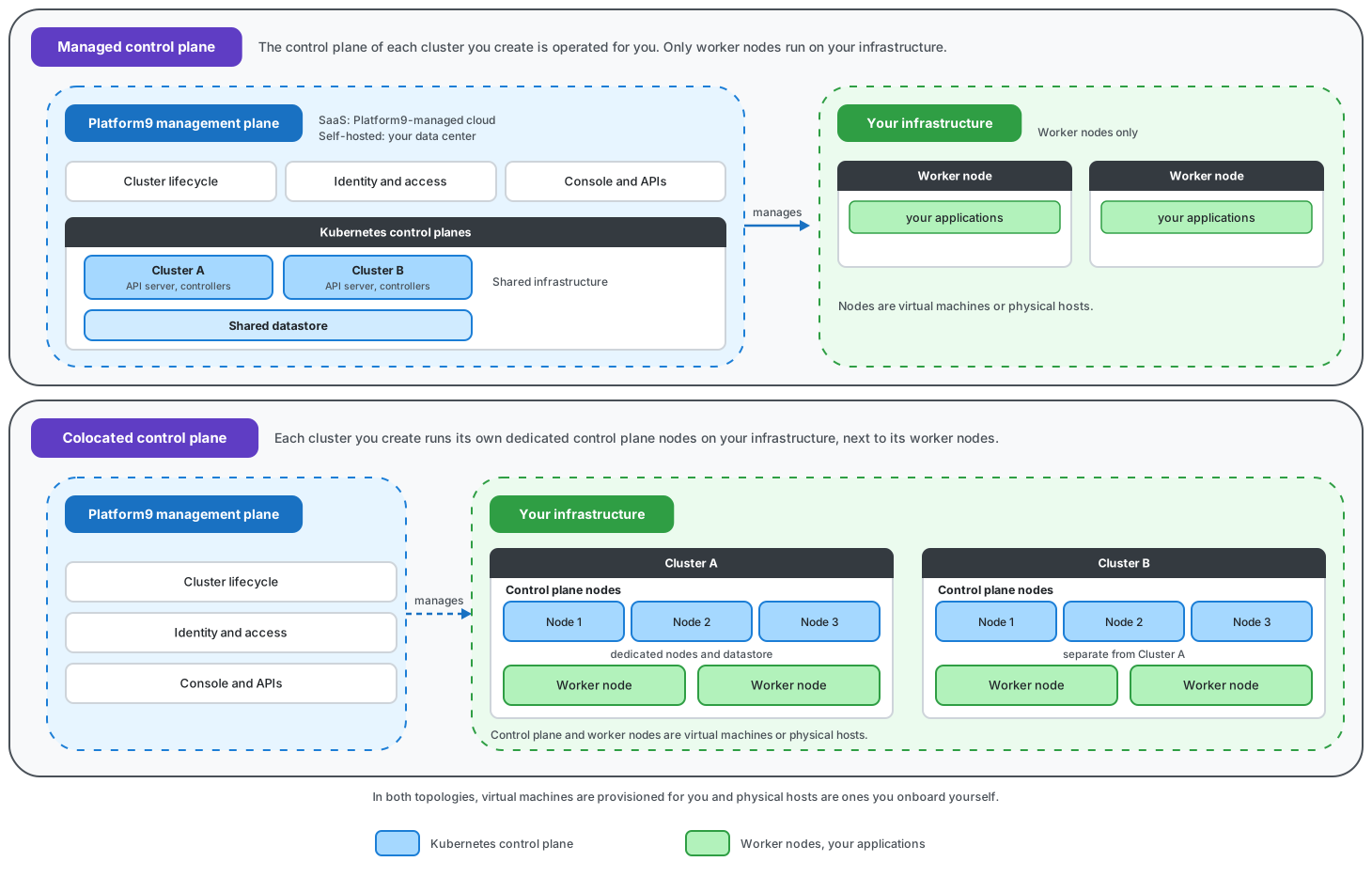
The diagram below shows where the Kubernetes control plane runs under each control plane type, and what that leaves running on your own infrastructure.
The following table summarizes where each part of a cluster runs, for each combination of control plane type and deployment model.
| Control Plane Type | Deployment Model | Where the Kubernetes Control Plane Runs | Where Worker Nodes Run | Who Operates What |
| ------------------ | ------------------- | ------------------------------------------------------------------------------------------------------------------------------ | ---------------------- | ------------------------------------------------------------------------------------------------------------------------------------------------------------------------------------------------ |
| Managed | SaaS | On the Platform9-managed cloud | On your infrastructure | Platform9 operates the cluster's control plane and the infrastructure hosting it. You operate the nodes and the workloads on them. |
| Managed | Self-hosted | On your own space.vars.product\_acronym management plane, in your data center or private cloud | On your infrastructure | space.vars.product\_acronym operates the cluster's control plane. Your platform team operates the management plane hosting it, plus the nodes and the workloads. |
| Colocated | SaaS or self-hosted | On dedicated control plane nodes on your infrastructure, alongside the cluster's worker nodes | On your infrastructure | You provide the capacity for both the control plane nodes and the worker nodes. space.vars.product\_acronym provisions them and manages the cluster lifecycle. |
A Colocated control plane runs on your own infrastructure under both deployment models, which is why the two models share a row.
## Management Plane
The management plane is the control point for both virtualization and Kubernetes in space.vars.product\_name. Hosting both in one place is what lets you manage Kubernetes clusters and virtual machines side by side, from one console and one identity model.
The management plane:
* Hosts the Compute, Networking, and Identity APIs alongside the Kubernetes Cluster API components.
* Manages Kubernetes clusters using Cluster API, and provides central control over cluster lifecycle operations.
* Hosts Managed control planes for the clusters that use them.
* Supports multi-tenancy, and manages users and role-based access control.
* Handles API requests, authentication, and authorization.
Where the management plane itself runs depends on your deployment model. Under SaaS it runs on the Platform9-managed cloud. Under self-hosted it runs on your own infrastructure, and your platform team plans its capacity.
The management plane reaches your clusters through agents that run on the cluster nodes. On virtualized nodes those agents are installed for you when space.vars.product\_acronym provisions the node virtual machines. On physical machines you install the host agent yourself as part of onboarding, and the machine registers itself with space.vars.product\_name from there.
## Kubernetes Control Plane
Every cluster's control plane runs the same standard Kubernetes components: the API server, the controller manager, the scheduler, and an etcd datastore. What differs between the two control plane types is where those components run, who provisions them, and whether the datastore is shared. To compare the two types and decide which one a given cluster needs, see [Control Plane Types](/private-cloud-director/kubernetes-clusters/control-plane-types.md).
**Managed Control Plane.** The cluster's control plane runs as a service operated for you, on the Platform9-managed cloud under SaaS, or on your own management plane under self-hosted. You never provision or maintain control plane nodes. Managed control planes share common infrastructure, including the datastore that holds their cluster state.
**Colocated Control Plane.** Each cluster gets its own dedicated control plane nodes, running on your own infrastructure alongside its worker nodes, with its own dedicated datastore. A Colocated control plane uses an odd number of at least three nodes, so the cluster keeps a quorum if one of them is lost.
On physical nodes, a Colocated control plane also takes a virtual IP address and a network interface, which `kube-vip` uses to advertise a stable Kubernetes API server endpoint across the control plane hosts.
{% hint style="info" %}
A cluster's control plane type is chosen when the cluster is created, and cannot be changed afterwards. To switch, create a new cluster of the other type and migrate the workloads to it.
{% endhint %}
## Cluster Nodes
Worker nodes run your applications. They run on your own infrastructure under both deployment models and both control plane types. A cluster uses either virtualized nodes or physical nodes, not a mixture of the two.
### Virtualized Nodes
Virtualized nodes are virtual machines that space.vars.product\_acronym provisions on one of your [virtualized clusters](/private-cloud-director/virtualized-clusters/virtualized-cluster-blueprint.md), then bootstraps as Kubernetes nodes.
They are configured through node groups. A node group is a logical entity that acts as a template for a set of nodes, each group with its own node count, networking, and storage properties.
* **Scaling.** You can set a node group's node count directly, or enable autoscaling on the group and set a maximum node count. space.vars.product\_acronym deploys and operates a Kubernetes cluster autoscaler for each cluster, so there is nothing to install yourself.
* **Storage.** Node root volumes can use either ephemeral storage or volume-backed storage. Volume-backed root volumes are useful when the compute hosts have limited local disk space.
* **Upgrades.** Kubernetes version upgrades and similar operations are performed by creating a new set of nodes and recycling the old ones, rather than by changing nodes in place. Size the cluster with enough nodes for that replacement to happen safely.
### Physical Nodes
Physical nodes are bare metal machines that you onboard yourself. Onboarding installs the host agent on the machine and registers it with space.vars.product\_name, after which the machine is available to join a cluster. You select the specific machines that become control plane nodes and worker nodes when you create the cluster.
{% hint style="info" %}
Cluster autoscaling is not supported on clusters built from physical nodes. Node counts on those clusters change by adding or removing onboarded machines. Bare metal support for Kubernetes in space.vars.product\_name is currently in `beta`.
{% endhint %}
## Cluster Lifecycle Automation
space.vars.product\_acronym uses Cluster API to drive cluster lifecycle declaratively. You describe the cluster you want, and the platform reconciles the infrastructure to match it. In practice that means:
* Node virtual machines are created, bootstrapped, and joined to the cluster for you, along with the networking they need.
* Nodes are replaced rather than changed in place when a cluster is upgraded, so an upgrade rolls through the node groups.
* Node groups scale up and down on demand through the per-cluster Kubernetes cluster autoscaler, on clusters where autoscaling is enabled.
* Cluster add-ons are delivered and kept in step with the cluster's declared configuration.
## Access and Interfaces
The space.vars.product\_name console is the primary interface. It provides self-service provisioning and management of Kubernetes clusters for administrators and self-service users across your tenants, regions, and domains, so Kubernetes clusters and virtualized clusters are managed side by side in a multi-tenant fashion.
Clusters are also described and managed declaratively through their Cluster API resources. That is where custom Kubernetes flags for the API server, the controller manager, and the scheduler are expressed.
To reach a cluster's own Kubernetes API with `kubectl`, download its kubeconfig from the console. See [Cluster Access - Kubeconfig](/private-cloud-director/kubernetes-clusters/cluster-lifecycle/cluster-access-kubeconfig.md).
## Related Pages
* [Overview](/private-cloud-director/kubernetes-clusters/k8s-overview.md): what Kubernetes on space.vars.product\_name offers
* [Control Plane Types](/private-cloud-director/kubernetes-clusters/control-plane-types.md): how Managed and Colocated control planes differ, and how to choose between them
* [Getting Started](/private-cloud-director/kubernetes-clusters/getting-started-with-kubernetes-in-pcd.md): deploy your first cluster on virtualized nodes, and choose its control plane type
* [Set up your Bare Metal Kubernetes Cluster](/private-cloud-director/kubernetes-clusters/setup-bare-metal-kubernetes-clusters.md): onboard physical machines and build a cluster on them
* [Pre-requisites](/private-cloud-director/kubernetes-clusters/k8s-pre-requisites.md): what to have in place before you create a cluster
* [Cluster Lifecycle](/private-cloud-director/kubernetes-clusters/cluster-lifecycle.md): scaling, upgrading, add-ons, and day-two operations
---
# Agent Instructions
This documentation is published with GitBook. GitBook is the documentation platform designed so that both humans and AI agents can read, navigate, and reason over technical content effectively. Learn more at gitbook.com.
## Querying This Documentation
If you need additional information that is not directly available in this page, you can query the documentation by asking a question.
Perform an HTTP GET request on the following URL with the `ask` and `goal` query parameters:
```
GET https://docs.platform9.com/private-cloud-director/kubernetes-clusters/architecture-and-technical-overview.md?ask=&goal=
```
`ask` is the immediate question: it should be specific, self-contained, and written in natural language.
`goal` is what the user is ultimately trying to achieve, the reason they need the answer. Sharing it helps GitBook give you a better, more relevant answer. A goal is most helpful when it describes the outcome the user wants rather than restating the question. For example, with `ask=how do I create an API token`, a goal like `automate deployments from our CI pipeline` lets GitBook tailor the answer to that use case.
The response will contain a direct answer to the question and relevant excerpts and sources from the documentation.
Use this mechanism when the answer is not explicitly present in the current page, you need clarification or additional context, or you want to retrieve related documentation sections.