> For the complete documentation index, see [llms.txt](https://docs.platform9.com/llms.txt). Markdown versions of documentation pages are available by appending `.md` to page URLs; this page is available as [Markdown](https://docs.platform9.com/private-cloud-director/storage/volume/volume-snapshot.md).
# Volume Snapshot
Volume snapshotting provides to you the ability to create point-in-time snapshots of block storage volumes. A volume snapshot is a read-only, consistent copy of a block storage volume at a specific moment. These snapshots are crucial for data protection, enabling users to restore a volume to a previous state or create new volumes based on the snapshot.
## Volume Snapshot Characteristics
Key characteristics of volume snapshots:
* **Point-in-time consistency:** Snapshots capture the data on a volume at the exact moment the snapshot is created, ensuring data integrity.
* **Read-only:** Snapshots cannot be directly modified; they serve as a reference point for creating new volumes or restoring existing ones.
* **Space efficiency:** Many block storage drivers implement snapshots using **copy-on-write** mechanisms, meaning they only consume additional storage space for data blocks that have changed since the snapshot was created.
* **Disaster recovery and data protection:** Snapshots are a fundamental component of backup and recovery strategies, allowing for quick restoration of data in case of corruption or accidental deletion.
## Snapshot Use Cases
Volume snapshots can be used in two scenarios
* **Creating a new volume:** Users can create a new block storage volumes from an existing volume snapshot, effectively cloning the volume's content at the time of the snapshot. This is useful for creating test environments or replicating data.
* **Reverting a volume:** You can also revert a volume to a previous snapshot, restoring the volume's content to the state it was in when the snapshot was taken.
## Volume and Volume Snapshot Relationship
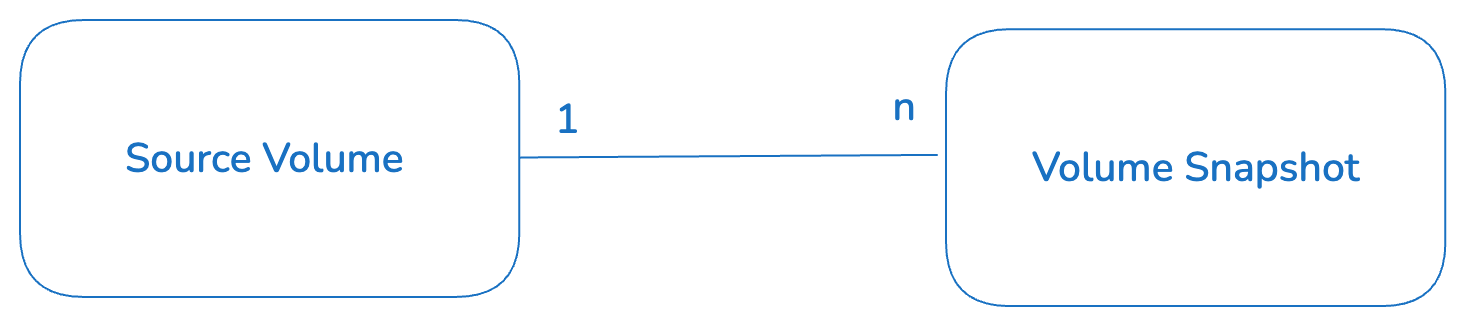
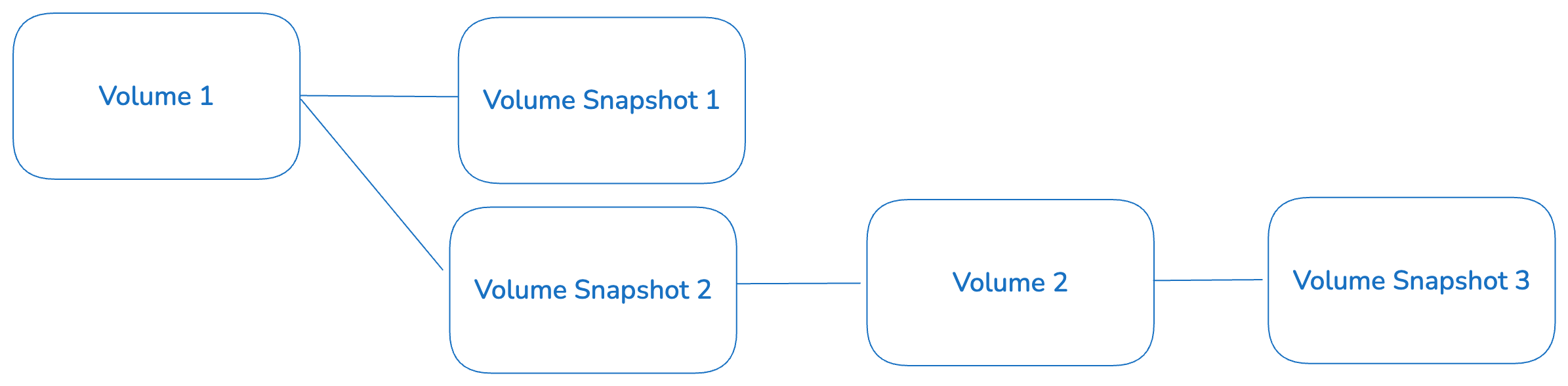
A volume snapshot is **always created from a volume**. You can create multiple volume snapshots for a given volume, at various points in time. These essentially act as a point in time copy of the volume at those times, and can be used to restore the volume to a previous well known state if the volume were to experience issues.
You can also use a volume snapshot to create a new volume.
It is therefore possible to create nested volume and volume snapshot hierarchies as shown in the example below.
This is important to take into account specially when you try to delete a volume snapshot.
## Create a Volume Snapshot
You can create a volume snapshot by navigating to the space.vars.product\_name UI Storage menu, then clicking on Volumes sub menu to see all the volumes. Then you can select a specific volume and select the snapshot action from the action bar.
## Snapshotting an In-Use Volume
You can take a snapshot of a volume that is currently attached to a virtual machine and actively being written to. The resulting snapshot in this case will be *crash-consistent* but is not guaranteed to be *application-consistent*. This means that the snapshot will not have any corrupted data blocks. However, if there were any writes in flight when the snapshot was created, they may not be part of the snapshot.
For optimal data consistency, it is recommended to quiesce the application or file system on the virtual machine before creating the snapshot, if feasible.
## Delete a Volume Snapshot
To delete a volume snapshot, navigate to **Storage** in the left-hand navigation menu, select **Volume Snapshots**, then choose the delete action. The UI blocks deletion when a volume snapshot is associated with a VM snapshot. The equivalent command is:
```bash
pcdctl volume snapshot delete
```
Before deleting a snapshot, check its dependencies. On most storage backends, a volume created from a snapshot retains a persistent dependency on that snapshot. A snapshot that backs a VM snapshot is also protected.
### Volume Snapshots That Back a VM Snapshot
When you snapshot a virtual machine whose root disk is a volume, space.vars.product\_name creates one volume snapshot per attached volume and stores a metadata entry in the Image Library Service that references them. That metadata entry is the VM snapshot you see in the UI; the data itself lives in the volume snapshots. Deleting one of those volume snapshots on its own leaves the VM snapshot listed but unusable, because the data it points to is gone.
The Persistent Storage Service therefore refuses to delete a volume snapshot while the VM snapshot that references it still exists. The check runs in the storage service API, so it applies to every caller equally: the UI, `pcdctl`, direct API calls, and third-party backup tools.
Delete in this order instead:
1. Delete the VM snapshot first. Leave **Delete all the associated volume snapshots** selected in the **Delete Snapshot(s)** dialog and the volume snapshots are removed in the same operation. See [Virtual Machine Snapshot](/private-cloud-director/virtualized-clusters/virtualmachine/virtual-machine-snapshot.md) for the full procedure.
2. If you cleared that checkbox and kept the volume snapshots, delete them individually once the VM snapshot is gone.
### Understand the Deletion Errors
Two levels of protection apply, depending on how much the snapshot's metadata records about the VM snapshot that owns it.
**The VM snapshot is identified exactly.** The snapshot metadata carries the ID of the VM snapshot image, and that image still exists. The request is rejected with HTTP 409 and this message:
```none
Cannot delete snapshot : it is referenced by image . Please delete the image first.
```
This block cannot be overridden. Delete the VM snapshot, then retry.
**The VM snapshot is identified by name only.** The snapshot metadata carries the name of the VM snapshot image but not its ID, which happens if the ID could not be recorded when the VM snapshot was created. A VM snapshot with that name still exists, so the request is rejected with HTTP 409 and this message:
```none
Cannot delete snapshot : an image named '' exists in Glance and may reference this snapshot. Please delete the image first.
```
Names are not unique, so this match can be a false positive. If you have confirmed that the VM snapshot owning this volume snapshot is already gone, you can override the name check:
```bash
pcdctl volume snapshot delete --force
```
The override applies only to the name check. It has no effect when the VM snapshot is identified exactly, as described above.
{% hint style="info" %}
**When the Image Library Service is unreachable**
The check has to confirm with the Image Library Service that the VM snapshot is really gone. If that service cannot be reached, the deletion is blocked rather than allowed, and the request is rejected with HTTP 503 and a message reporting that the image could not be verified. This is deliberate: allowing the deletion would risk breaking a VM snapshot permanently. Retry once the Image Library Service is healthy.
{% endhint %}
### Volume Snapshots Created Before This Release
The protection relies on metadata that space.vars.product\_name writes when it creates the volume snapshots for a VM snapshot: the ID of the source VM, the name of the VM snapshot image, and, once the image exists, its ID. Volume snapshots created before this release carry none of that metadata, so the check is skipped for them and they remain deletable without restriction. Take care when deleting an older volume snapshot that a VM snapshot may still depend on.
## Volume Snapshot Properties
Below are the core properties of a volume snapshot.
* `id` – Unique UUID of the snapshot
* `name` – User-facing name of the snapshot
* `description` – Optional human readable description
* `size` – Size of the snapshot in GB (This will be same as source volume at creation time)
* `status` – Current state of the snapshot (e.g., creating, available, deleting, error)
* `created_at` *–* Timestamp \_\_when the snapshot \_\_was created
* `updated_at` – Timestamp when the snapshot was last updated
* `volume_id` – The ID of the source volume from which this snapshot was created
### Metadata and other extended properties
A volume snapshot also has the following properties to represent it's metadata or other extended properties:
* `metadata` – Key/value metadata pairs provided by user or backend
* `os-extended-snapshot-attributes:progress` – % completion during creation
* `os-extended-snapshot-attributes:project_id`*–* Tenant that owns the snapshot
* `user_id` – User who created the snapshot
* `os-extended-snapshot-attributes:provider_id` – Internal provider reference for backend storage
## Related Pages
* [Virtual Machine Snapshot](/private-cloud-director/virtualized-clusters/virtualmachine/virtual-machine-snapshot.md): how a VM snapshot references volume snapshots, and how to delete one
* [Volume](/private-cloud-director/storage/volume.md): volume properties, the sources a volume can be created from, and volume deletion rules
* [Volume State](/private-cloud-director/storage/volume/volume-state.md): the states a volume moves through, and what a stuck state means
---
# Agent Instructions
This documentation is published with GitBook. GitBook is the documentation platform designed so that both humans and AI agents can read, navigate, and reason over technical content effectively. Learn more at gitbook.com.
## Querying This Documentation
If you need additional information that is not directly available in this page, you can query the documentation by asking a question.
Perform an HTTP GET request on the following URL with the `ask` and `goal` query parameters:
```
GET https://docs.platform9.com/private-cloud-director/storage/volume/volume-snapshot.md?ask=&goal=
```
`ask` is the immediate question: it should be specific, self-contained, and written in natural language.
`goal` is what the user is ultimately trying to achieve, the reason they need the answer. Sharing it helps GitBook give you a better, more relevant answer. A goal is most helpful when it describes the outcome the user wants rather than restating the question. For example, with `ask=how do I create an API token`, a goal like `automate deployments from our CI pipeline` lets GitBook tailor the answer to that use case.
The response will contain a direct answer to the question and relevant excerpts and sources from the documentation.
Use this mechanism when the answer is not explicitly present in the current page, you need clarification or additional context, or you want to retrieve related documentation sections.