> For the complete documentation index, see [llms.txt](https://docs.platform9.com/llms.txt). Markdown versions of documentation pages are available by appending `.md` to page URLs; this page is available as [Markdown](https://docs.platform9.com/private-cloud-director/getting-started/getting-started-with-community-edition/install.md).

# Install

{% hint style="danger" %}
**Community Edition is not for production workloads.** Use it for labs, evaluation, and learning only.
{% endhint %}

{% hint style="info" %}
For a guided walkthrough, use [Beginner’s Guide to Deploying PCD Community Edition](/private-cloud-director/tutorials/beginners-guide-to-deploying-pcd-community-edition.md).
{% endhint %}

## Install Community Edition

This installs the Community Edition (CE) control plane on a single **CE host**. You then onboard one or more **hypervisor hosts** to run VMs.

{% hint style="info" %}
Read [Prerequisites](/private-cloud-director/getting-started/getting-started-with-community-edition/prerequisites.md) first. See [Custom Installation](/private-cloud-director/getting-started/getting-started-with-community-edition/custom-installation.md) if you need custom CIDRs or domains.
{% endhint %}

### Outcome

After install, you can:

* Log in to the web UI
* Onboard hypervisor hosts
* Create networks, images, and VMs
* View metrics in the web UI or Grafana

### Timeline

Typical runtime is \~45 minutes. Slow systems or slow registries can push it to \~90 minutes.

* 5–10 min: system prep and prerequisite checks
* 10–15 min: K3s cluster creation
* 20–30 min: <code class="expression">space.vars.product\_acronym</code> services deployment to the K3s cluster
* \~5 min: verification and credential output

### Deploy the CE host

Run the installer on the CE host as a user with `sudo` access.

```bash
curl -sfL https://go.pcd.run | bash
```

{% hint style="info" %}
By default in Ubuntu, all users in the `sudo` group have the ability to sudo. Group membership can be validated with the command `groups <username>` and sudo permissions can be verified with `sudo -l -U <username>` .
{% endhint %}

The installer will:

* Ask you to accept the [Community Edition EULA](https://platform9.com/ce-eula)
* Ask whether to enable the Kubernetes management plane (optional - see [Kubernetes management plane prompt](#kubernetes-management-plane-prompt))
* Run prerequisite checks
* Deploy the CE management plane
* Print the user interface web address and provide admin credentials

If prerequisite checks fail, see [Common Issues](/private-cloud-director/getting-started/getting-started-with-community-edition/common-issues.md). If installation fails, the installer can optionally upload a support bundle.

#### Kubernetes management plane prompt

The installer asks whether to enable the Kubernetes management plane, which lets you provision managed Kubernetes clusters. This is opt-in — the default is No.

Enabling it:

* Adds approximately 10 minutes to install time
* Requires a larger CE host - 12 CPUs and 32 GB RAM minimum (see [Prerequisites](/private-cloud-director/getting-started/getting-started-with-community-edition/prerequisites.md#kubernetes-management-plane-optional))

To skip the prompt for automation, pre-export the variable before running the installer:

```bash
# Enable Kubernetes management plane
export ENABLE_K8S=true

# Disable Kubernetes management plane
export ENABLE_K8S=false
```

<details>

<summary>Installation example</summary>

```bash
ubuntu@ce-host:~$ curl -sfL https://go.pcd.run | bash
Private Cloud Director Community Edition Deployment Started...

By continuing with the installation, you agree to the terms and conditions of the
Private Cloud Director Community Edition EULA.

Please review the EULA at: https://platform9.com/ce-eula

Do you accept the terms of the EULA? [Y/N]: y

Private Cloud Director can install a Kubernetes management plane
that lets you provision managed Kubernetes clusters.
This is optional and adds ~10 minutes to install time and requires additional
CPU / memory (see [Prerequisites](prerequisites.md)).

Enable Kubernetes management plane? [y/N]: y

Finding latest version...  Done
Downloading artifacts...  Done
Configuring system settings...  Done
Installing artifacts and dependencies...  Done
Configuring Docker Mirrors...  Done
 SUCCESS  Configuration completed
 INFO  Verifying system requirements...
 ✓  Architecture
 ✓  Disk Space
 ✓  Memory
 ✓  CPU Count
 ✓  OS Version
 ✓  Swap Disabled
 ✓  IPv6 Support
 ✓  Kernel and VM Panic Settings
 ✓  Port Connectivity
 ✓  Firewalld Service
 ✓  Default Route Weights
 ✓  Basic system services
Completed Pre-Requisite Checks on local node
 SUCCESS  Cluster created successfully
 INFO  Starting PCD management plane
 SUCCESS  Certificates generated
 SUCCESS  Base infrastructure setup complete
 SUCCESS  Installed Kubernetes management plane
 SUCCESS  pcd-virt deployment now complete
 SUCCESS  Final touches...
Private Cloud Director (Community Edition) deployment complete!
How would you rate your Private Cloud Director (Community Edition) installation experience?
(1-5, press Enter to skip): 5

------------- deployment details ---------------
fqdn:                pcd.pf9.io
region:              pcd
deployment status:   ready
region health:       ✅ Ready
version:              PCD 2026.4-116
-------- region service status ----------
desired services:     56
ready services:       56

Login Details:
URL: https://pcd.pf9.io
email:     admin@airctl.localnet
password:  wVXJbocBrZaqcjtS

See documentation at https://pcd.run for next steps.

Join the support community at https://reddit.com/r/platform9
ubuntu@ce-host:~$
```
</details>

#### Enable Kubernetes management plane on an existing CE installation

To enable the Kubernetes management plane on an existing CE deployment:

{% hint style="info" %}
The base CE installation must be fully deployed and healthy before running this command.
{% endhint %}

```bash
sudo /opt/pf9/airctl/airctl start --config /opt/pf9/airctl/conf/airctl-config.yaml --k8s-only
```

This takes approximately 10 minutes.

To verify the installation succeeded:

```bash
kubectl get pods -n kaapi
```

All pods should show `Running`.

{% hint style="warning" %}
The CE host must meet the minimum requirements for the Kubernetes management plane: 12 CPUs and 32 GB RAM. See [Prerequisites](/private-cloud-director/getting-started/getting-started-with-community-edition/prerequisites.md#kubernetes-management-plane-optional).
{% endhint %}

### Access the web UI

For default installations, the web user interface can be accessed at `https://pcd.pf9.io`. That name must resolve from your browser.

{% hint style="info" %}
If you've [customized the Community Edition FQDN](/private-cloud-director/getting-started/getting-started-with-community-edition/custom-installation.md#deployment-fqdn-fully-qualified-domain-name), then replace `pcd.pf9.io` with that value.
{% endhint %}

#### Option 1: Local hosts file (single machine)

Use this for quick testing, as only your computer will be able to resolve the URL to the user interface.

**Linux/MacOS**

```bash
# Replace <CE_HOST_IP> with your CE host IP
echo "<CE_HOST_IP> pcd.pf9.io" | sudo tee -a /etc/hosts

# Example
echo "192.168.1.100 pcd.pf9.io" | sudo tee -a /etc/hosts
```

**Windows**

1. Open Notepad as Administrator. From the Windows Start menu, right-click the Notepad icon and choose "Run as Administrator".
2. Open `C:\Windows\System32\drivers\etc\hosts`.
3. Add the following, but be sure to replace the example IP. Save and close the file afterwards.

```
192.168.1.100 pcd.pf9.io
```

#### Option 2: Real DNS (team access)

Create A records in your DNS server:

```
pcd.pf9.io            -> <CE_HOST_IP>
```

### Log in

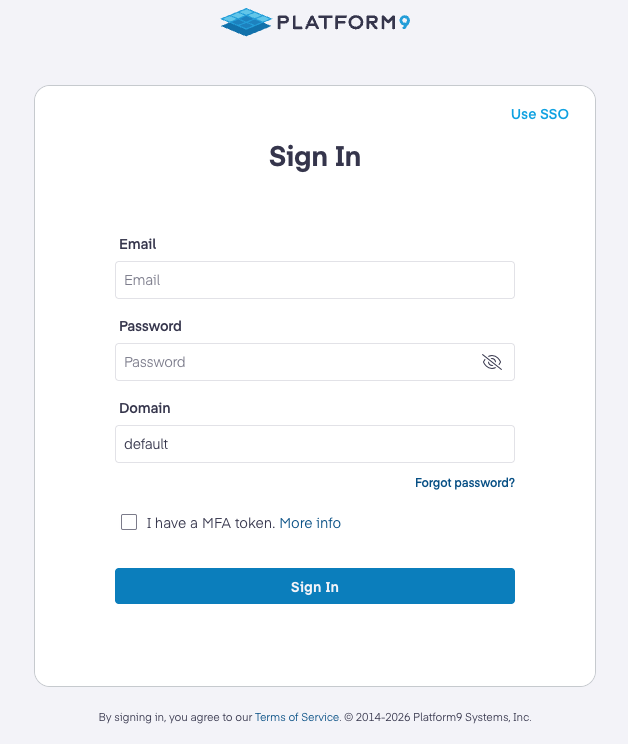
Open the user interface URL in a browser (the default is [pcd.pf9.io](https://pcd.pf9.io/)). Accept the self-signed certificate on first visit.

* Select **Use local credentials**.
* Use the `admin@airctl.localnet` credentials printed by the installer.
* Keep **Domain** as `default`.
* Do not check "I have an MFA token".

{% hint style="info" %}
SSO & MFA are unavailable until configured. Errors with an SSO or MFA login attempt will fail until they are configured.
{% endhint %}

<figure><img src="/files/sUGZrOckQIKwWkm8naA8" alt="Private Cloud Director Community Edition local credentials login screen"><figcaption><p>Private Cloud Director Community Edition local credentials login screen</p></figcaption></figure>

### Admin credentials and Grafana access

Do not rename the default admin user, `admin@airctl.localnet`. Do not change its password.

This account is used internally by <code class="expression">space.vars.product\_name</code> services.

Create separate users for administrator or self-service access.

{% hint style="warning" %}
The default admin account is also used for Grafana authentication. Changing the default admin email or password can break Grafana access.
{% endhint %}

### Next steps

1. See the Getting Started guide at [Getting Started](/private-cloud-director/getting-started/getting-started.md#step-2-create-cluster-blueprint-and-virtualized-cluster)
2. Follow the rest of the Getting Started guide to onboard hypervisor hosts, create networks, upload images, and create virtual machines.

***

## Operations and troubleshooting

<details>

<summary>Validate the installation</summary>

Your deployment is healthy if the region is marked as `Ready`. Ready services should match desired services.

```bash
/opt/pf9/airctl/airctl status --config /opt/pf9/airctl/conf/airctl-config.yaml
```

Example output:

```bash
root@pcd-ce:~# /opt/pf9/airctl/airctl status --config /opt/pf9/airctl/conf/airctl-config.yaml
------------- deployment details ---------------
fqdn:                pcd.pf9.io
region:              pcd
deployment status:   ready
region health:       ✅ Ready
version:              PCD 2026.4-108
-------- region service status ----------
desired services:     54
ready services:       54
```

</details>

<details>

<summary>Retrieve admin credentials</summary>

```bash
/opt/pf9/airctl/airctl get-creds --config /opt/pf9/airctl/conf/airctl-config.yaml
```

</details>

<details>

<summary>Logs and service names</summary>

**Hypervisor host logs**

* `/var/log`
* `/var/log/pf9`

**CE host logs**

* `/var/log/pf9/fluentbit/ddu.log` (JSON; includes Kubernetes pod logs)

You can also use `kubectl logs` to fetch pod logs.

**Hypervisor host services**

Service names start with `pf9`. Examples:

* `pf9-hostagent`
* `pf9-imagelibrary`
* `pf9-ostackhost`

</details>

<details>

<summary>Grafana credentials</summary>

Grafana uses the same admin credentials printed at install time.

* Username: `admin@airctl.localnet`
* Password: retrieve from the CE host:

```bash
/opt/pf9/airctl/airctl get-creds --config /opt/pf9/airctl/conf/airctl-config.yaml
```

Default Grafana URL:

* `https://pcd.pf9.io/grafana/login`

</details>

<details>

<summary>Reset Grafana admin password (advanced)</summary>

{% hint style="danger" %}
Resetting Grafana independently is not recommended. Keep Grafana and UI admin passwords in sync.
{% endhint %}

The namespace is `pcd` by default. If you customized the FQDN, use the FQDN shortname for the namespace. Example: If the FQDN is *ce.acmeretail.com*, assign `ce` to the `NS` variable in the below example.

```bash
NS=pcd
kubectl exec -it deploy/grafana -n $NS -- grafana cli admin reset-admin-password <strong-password>
```

</details>

<details>

<summary>Uninstall Community Edition</summary>

```bash
/opt/pf9/airctl/airctl delete-cluster --config /opt/pf9/airctl/conf/airctl-config.yaml
```

</details>

<details>

<summary>Expand an Ubuntu logical volume (LVM)</summary>

If your root filesystem is smaller than the physical volume, expand it.

1. Find the root device:

```bash
df -h /
```

2. Resize the LV (example name shown):

```bash
sudo lvresize -l +100%FREE /dev/mapper/ubuntu--vg-ubuntu--lv
```

3. Resize the filesystem:

```bash
sudo resize2fs /dev/mapper/ubuntu--vg-ubuntu--lv
```

</details>

### Troubleshooting

Start with [Common Issues](/private-cloud-director/getting-started/getting-started-with-community-edition/common-issues.md).

#### Optional learning resources

Platform9 YouTube:

* Channel: <https://www.youtube.com/@Platform9>
* Playlist: [Private Cloud Director playlist](https://www.youtube.com/playlist?list=PLUqDmxY3RncUmegG6dv8XxjSr0g1THpLq)


---

# Agent Instructions
This documentation is published with GitBook. GitBook is the documentation platform designed so that both humans and AI agents can read, navigate, and reason over technical content effectively. Learn more at gitbook.com.

## Querying This Documentation
If you need additional information that is not directly available in this page, you can query the documentation dynamically by asking a question.

Perform an HTTP GET request on the current page URL with the `ask` query parameter, and the optional `goal` query parameter:

```
GET https://docs.platform9.com/private-cloud-director/getting-started/getting-started-with-community-edition/install.md?ask=<question>&goal=<endgoal>
```

`ask` is the immediate question: it should be specific, self-contained, and written in natural language.
`goal` is optional and describes the broader end goal you are ultimately trying to accomplish on behalf of the user. GitBook uses it to tailor the answer towards what is most useful for that goal.

The response will contain a direct answer to the question and relevant excerpts and sources from the documentation.

Use this mechanism when the answer is not explicitly present in the current page, you need clarification or additional context, or you want to retrieve related documentation sections.
