> For the complete documentation index, see [llms.txt](https://docs.platform9.com/llms.txt). Markdown versions of documentation pages are available by appending `.md` to page URLs; this page is available as [Markdown](https://docs.platform9.com/managed-kubernetes/clusters/advanced-cluster-configuration/registry-mirror-for-container-images.md).
# Registry Mirror For Container Images
## What is a Container Registry
A container registry is a catalogue of storage locations where you can push and pull container images.
However, the actual physical locations where images are stored are known as repositories. Each repository stores a collection of related images with the same name.
Each image within a repository represents a different version of the same container deployment. For example, on the popular container registry Docker Hub, nginx is the name of the repository that contains different versions of the Docker image for open-source web server installation NGINX.
A specific image is identified by either its tag or its own unique reference.
## What is a Registry Mirror
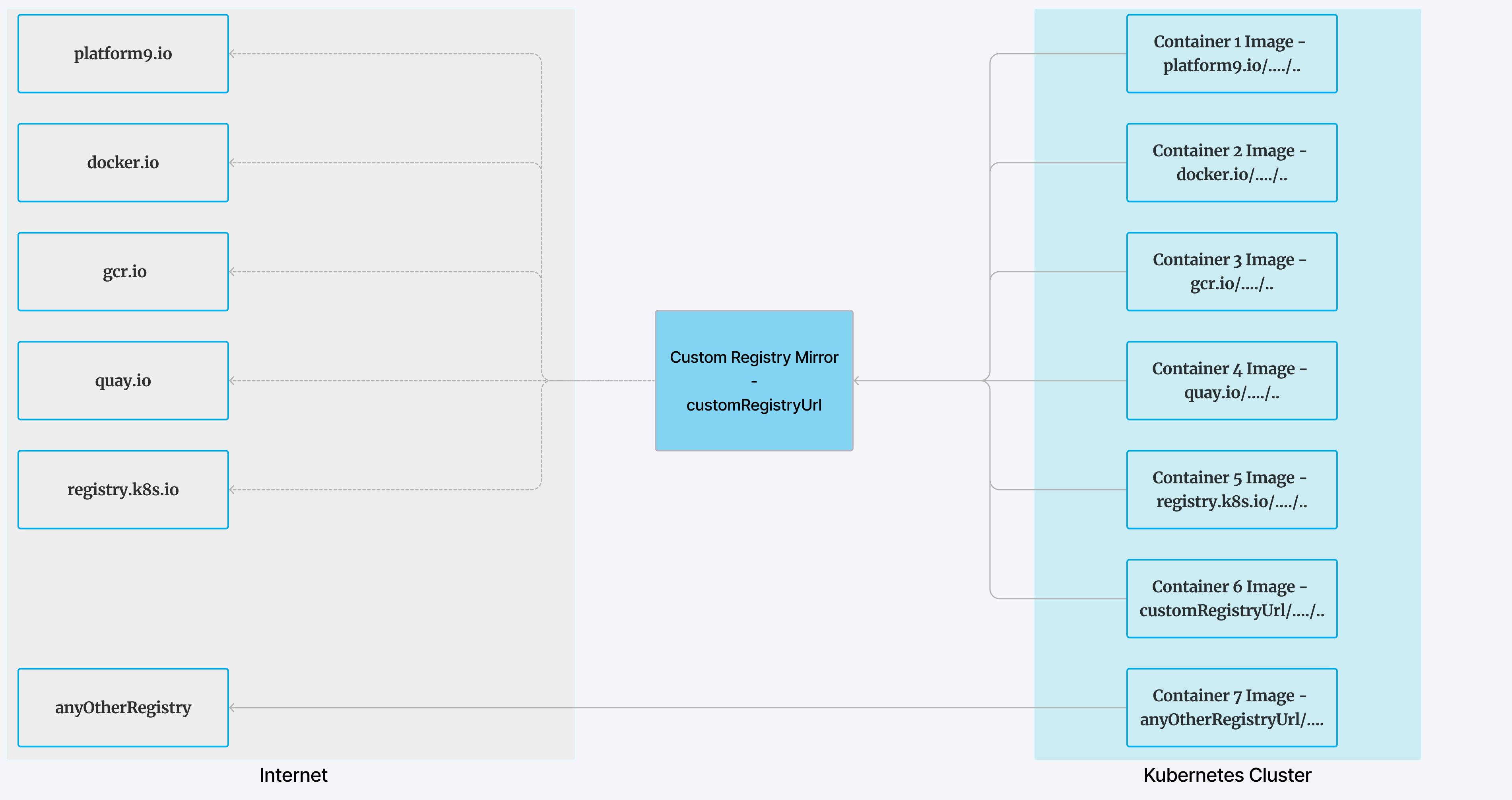
A registry mirror is a local copy of a public registry that copies or mirrors the file structure of the public registry. For example, let's say that the path to your registry mirror is `10.101.101.100:443`. When `containerd` encounters a request to pull an image such as `gcr.io/etcd-development/etcd:v3.5.5`, `containerd` attempts to pull that image, not from `gcr.io`, but from your registry at the following path: `10.101.101.100:443/etcd-development/etcd:v3.5.5`. If the image isn't in this registry path, the image is pulled automatically from the public registry `gcr.io`.
Using a registry mirror provides the following benefits:
* Can be used as custom registry for images.
* Protects from public registry outages.
* Speeds up pod creation.
* Allows to conduct image vulnerability scanning.
* Avoids limits imposed by public registries on how frequently you can issue commands to them.
## Using Registry Mirror with PMK clusters
#### Pre-requisites
* Container registry server set up in your network.
* If your registry server runs a private TLS certificate, you must have the certificate authority (CA) file.
* If your registry server needs authentication, you must have the login credentials.
* Must use containerd as a runtime.
* Supported only with PMK Qbert API and must be used to configure clusters.
* PMK support only the following repositories with this feature. Images with any other registry URL will be directly downloaded from the mentioned registry (See in figure - **anyOtherRegistry**).
* platform9.io
* docker.io
* gcr.io
* quay.io
* registry.k8s.io
#### Understanding the API Body changes in cluster API
API spec located at [Qbert API](/managed-kubernetes/apis/qbert-api.md)
Example:
{% tabs %}
{% tab title="Bash" %}
```bash
curl --request POST \
--url https://.platform9.net/qbert/v4/{projectId}/clusters \
--header "X-Auth-Token: {X-Auth-Token}" \
--data '{
"customRegistryUrl": "https://10.101.101.100:443",
"customRegistryRepoPath": "infra/k8s"
"customRegistryUsername": "username",
"customRegistryPassword": "password",
"customRegistrySkipTls": false,
"customRegistrySelfSignedCerts": true,
"customRegistryCertPath": "/usr/local/share/reg-ca.crt",
.
.
.
```
{% endtab %}
{% endtabs %}
| API Parameter | Type | Description | default | Example |
| ----------------------------- | ------- | ------------------------------------------------------------------------------------ | ------- | ------------------------------------------------------------------------------------------------------------------------------------------------------------------------------------------------------------------------------------------------------------------------ |
| customRegistryUrl | string | Endpoint URL for the registry. | null | Eg: [https://10.101.101.100:443](https://10.149.101.187), |
| customRegistryRepoPath | | Path where all images are cached. | null |
- Can be empty, meaning all images are cached at root. - Can be like infra where all images will be cached in infra repository. - Can be like infra/k8s where all images will be cached under infra/k8s
|
| customRegistryUsername | string | Username for the registry. | null | |
| customRegistryPassword | string | Password for the registry. | null | |
| customRegistrySkipTls | boolean | To be used to skip TLS. | false | |
| customRegistrySelfSignedCerts | boolean | To be used if the the registry has a self-signed certificate. | false | |
| customRegistryCertPath | string | Path to the cert file on the nodes or the endpoint URL from where it can be fetched. | null |
Can be of the following formats:
- - - file:///path/to/cert - /path/to/cert
|
**Note**: Before using the API
* Add the CA certificate file (ca.cert file) at specified location "customRegistryCertPath": "/usr/local/share/reg-ca.crt" on the node. **(this path should be readable by pf9 user)** OR
* Store the CA certificate file at some endpoint say `https://example.com/cacert` and set this field `to "customRegistryCertPath": "https://example.com/cacert"` so that the nodelet can fetch the cert from this endpoint and place it on nodes and configure it into containerd.
#### Example Registry
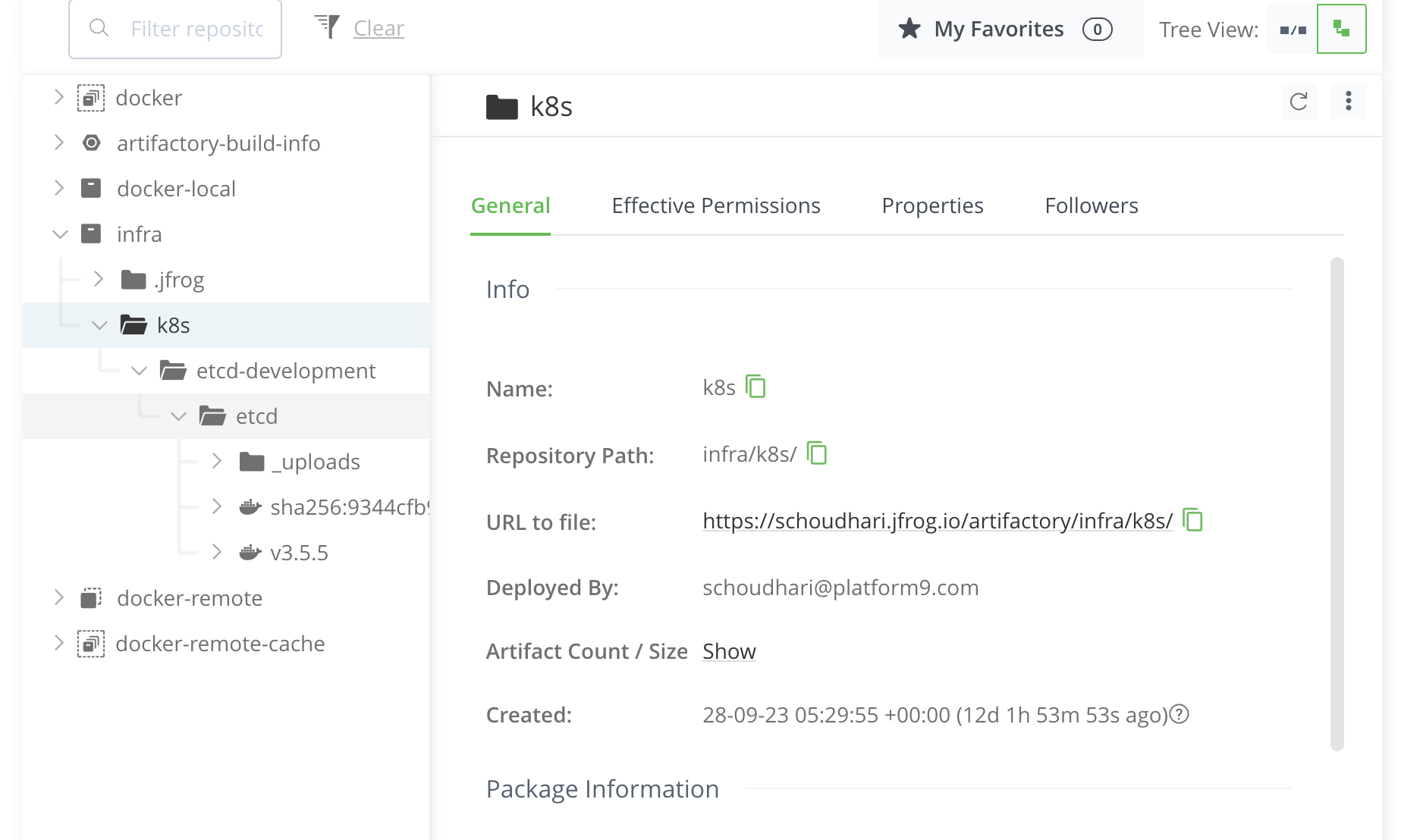
As a user if you have set up a private Jfrog registry like the below image:
API request body will have following parameters to use this feature:
{% tabs %}
{% tab title="JSON" %}
```json
"customRegistryUrl": "https://schoudhari.jfrog.io",
"customRegistryPath": "infra/k8s"
"customRegistryUsername": "username",
"customRegistryPassword": "password",
```
{% endtab %}
{% endtabs %}
#### How this feature affects containerd?
Containerd configurations for registries are stored at `/etc/containerd/certs.d` on the nodes.
For example, if `10.101.101.100:443` is used as the registry mirror and in PMK there are multiple images from various registries, the `/etc/containerd/certs.d` will look like:
{% tabs %}
{% tab title="Bash" %}
```bash
[root@test-pf9-qbert-bare-os-c7-cntrd-2855088-142 certs.d]# pwd
/etc/containerd/certs.d
[root@test-pf9-qbert-bare-os-c7-cntrd-2855088-142 certs.d]# tree
.
|-- 10.101.101.100:443
| `-- hosts.toml
|-- docker.io
| `-- hosts.toml
|-- gcr.io
| `-- hosts.toml
|-- platform9.io
| `-- hosts.toml
|-- quay.io
| `-- hosts.toml
`-- registry.k8s.io
`-- hosts.toml
```
{% endtab %}
{% endtabs %}
PMK currently has above 5 registries. Along with that, we configure the custom registry `10.101.101.100:443` . The pull requests to all the registries will go through config in their hosts.toml.
Listed are examples of all registry hosts.toml files for this case:
* 10.101.101.100:443 ← custom registry
{% tabs %}
{% tab title="Bash" %}
```bash
[root@test-pf9-qbert-bare-os-c7-cntrd-2855088-142 certs.d]# cat 10.101.101.100\:443/hosts.toml
server = "https://10.101.101.100:443"
[host."https://10.101.101.100:443/v2/infra/k8s"]
capabilities = ["pull", "resolve"]
ca = "/usr/local/share/reg-ca.crt"
override_path = true
[host."https://10.101.101.100:443/v2/infra/k8s".header]
authorization = "Basic d1h1YmhhbTpwZjck"
```
{% endtab %}
{% endtabs %}
* docker.io
{% tabs %}
{% tab title="Bash" %}
```bash
[root@test-pf9-qbert-bare-os-c7-cntrd-2855088-142 certs.d]# cat docker.io/hosts.toml
server = "https://docker.io"
[host."https://10.101.101.100:443/v2/infra/k8s"]
capabilities = ["pull", "resolve"]
ca = "/usr/local/share/reg-ca.crt"
override_path = true
[host."https://10.101.101.100:443/v2/infra/k8s".header]
authorization = "Basic d1h1YmhhbTpwZjck"
[host."https://dockermirror.platform9.io"]
capabilities = ["pull", "resolve"]
[host."https://registry-1.docker.io"]
capabilities = ["pull", "resolve"]
```
{% endtab %}
{% endtabs %}
* platform9.io
{% tabs %}
{% tab title="Bash" %}
```bash
[root@test-pf9-qbert-bare-os-c7-cntrd-2855088-142 certs.d]# cat platform9.io/hosts.toml
server = "https://platform9.io"
[host."https://10.101.101.100:443/v2/infra/k8s"]
capabilities = ["pull", "resolve"]
ca = "/usr/local/share/reg-ca.crt"
override_path = true
[host."https://10.101.101.100:443/v2/infra/k8s".header]
authorization = "Basic d1h1YmhhbTpwZjck"
[host."https://dockermirror.platform9.io"]
capabilities = ["pull", "resolve"]
```
{% endtab %}
{% endtabs %}
* quay.io
{% tabs %}
{% tab title="Bash" %}
```bash
[root@test-pf9-qbert-bare-os-c7-cntrd-2855088-142 certs.d]# cat quay.io/hosts.toml
server = "https://quay.io"
[host."https://10.101.101.100:443/v2/infra/k8s"]
capabilities = ["pull", "resolve"]
ca = "/usr/local/share/reg-ca.crt"
override_path = true
[host."https://10.101.101.100:443/v2/infra/k8s".header]
authorization = "Basic d1h1YmhhbTpwZjck"
[host."https://dockermirror.platform9.io"]
capabilities = ["pull", "resolve"]
```
{% endtab %}
{% endtabs %}
* gcr.io
{% tabs %}
{% tab title="Bash" %}
```bash
[root@test-pf9-qbert-bare-os-c7-cntrd-2855088-142 certs.d]# cat gcr.io/hosts.toml
server = "https://gcr.io"
[host."https://10.101.101.100:443/v2/infra/k8s"]
capabilities = ["pull", "resolve"]
ca = "/usr/local/share/reg-ca.crt"
override_path = true
[host."https://10.101.101.100:443/v2/infra/k8s".header]
authorization = "Basic d1h1YmhhbTpwZjck"
[host."https://dockermirror.platform9.io"]
capabilities = ["pull", "resolve"]
```
{% endtab %}
{% endtabs %}
* registry.k8s.io
{% tabs %}
{% tab title="Bash" %}
```bash
[root@test-pf9-qbert-bare-os-c7-cntrd-2855088-142 certs.d]# cat registry.k8s.io/hosts.toml
server = "https://registry.k8s.io"
[host."https://10.101.101.100:443/v2/infra/k8s"]
capabilities = ["pull", "resolve"]
ca = "/usr/local/share/reg-ca.crt"
override_path = true
[host."https://10.101.101.100:443/v2/infra/k8s".header]
authorization = "Basic d1h1YmhhbTpwZjck"
[host."https://dockermirror.platform9.io"]
capabilities = ["pull", "resolve"]
```
{% endtab %}
{% endtabs %}
### Using this feature during cluster creation
Cluster Create ([API Reference](/managed-kubernetes/apis/qbert-api.md))
* Use the Cluster POST API with the following parameters to use this feature. Example:
{% tabs %}
{% tab title="Bash" %}
```bash
curl --request POST \
--url https://.platform9.net/qbert/v4/{projectId}/clusters \
--header "X-Auth-Token: {X-Auth-Token}" \
--data '{
"customRegistryUrl": "https://10.101.101.100:443",
"customRegistryUsername": "user",
"customRegistryRepoPath": "infra/k8s",
"customRegistryPassword": "password",
"customRegistrySkipTls": false,
"customRegistrySelfSignedCerts": true,
"customRegistryCertPath": "http://10.101.101.100:8080/domain.crt",
.
.
.
```
{% endtab %}
{% endtabs %}
### Using this feature with an existing cluster with cluster Kubernetes version upgrade
Cluster Create ([API Reference](/managed-kubernetes/apis/qbert-api.md))
* Use the Cluster POST API with the following parameters to use this feature. Example:
{% tabs %}
{% tab title="Bash" %}
```bash
curl --request POST \
--url https://.platform9.net/qbert/v4/{project_uuid}/clusters/{uuid}/upgrade?type={type}&force={force} \
--header "X-Auth-Token: {X-Auth-Token}" \
--data '{
"customRegistryUrl": "{string}",
"customRegistryRepoPath": "{string}",
"customRegistryUsername": "{string}",
"customRegistryPassword": "{string}",
"customRegistrySkipTls": "{boolean}",
"customRegistrySelfSignedCerts": "{boolean}",
"customRegistryCertPath": "{string}",
.
.
.
```
{% endtab %}
{% endtabs %}
This shall update all the the nodes with new containerd configuration.
### Using this feature with an existing cluster with cluster update (no Kubernetes version upgrade)
Cluster Create ([API Reference](/managed-kubernetes/apis/qbert-api.md))
* Use the Cluster PUT API with the following parameters to use this feature. Example:
{% tabs %}
{% tab title="Bash" %}
```bash
curl --request PUT \
--url https://.platform9.net/qbert/v4/{project_uuid}/clusters/{uuid} \
--header "X-Auth-Token: {X-Auth-Token}" \
--data '{
"customRegistryUrl": "{string}",
"customRegistryRepoPath": "{string}",
"customRegistryUsername": "{string}",
"customRegistryPassword": "{string}",
"customRegistrySkipTls": "{boolean}",
"customRegistrySelfSignedCerts": "{boolean}",
"customRegistryCertPath": "{string}",
.
.
.
```
{% endtab %}
{% endtabs %}
**Note: With cluster update, following commands have to be run on each node of the cluster to restart the nodelet phases.** With cluster version upgrade, following takes places automatically during node upgrades.
Example:
{% tabs %}
{% tab title="Bash" %}
```bash
root@test-pf9-bare-os-u20-3074234-211-1:/etc/containerd/certs.d# systemctl stop pf9-hostagent
root@test-pf9-bare-os-u20-3074234-211-1:/etc/containerd/certs.d# systemctl stop pf9-nodeletd
root@test-pf9-bare-os-u20-3074234-211-1:/etc/containerd/certs.d# su pf9 -s /bin/bash
pf9@test-pf9-bare-os-u20-3074234-211-1:/etc/containerd/certs.d$ /opt/pf9/nodelet/nodeletd phases stop
root@test-pf9-bare-os-u20-3074234-211-1:/etc/containerd/certs.d# systemctl start pf9-hostagent
```
{% endtab %}
{% endtabs %}
---
# Agent Instructions
This documentation is published with GitBook. GitBook is the documentation platform designed so that both humans and AI agents can read, navigate, and reason over technical content effectively. Learn more at gitbook.com.
## Querying This Documentation
If you need additional information that is not directly available in this page, you can query the documentation by asking a question.
Perform an HTTP GET request on the following URL with the `ask` and `goal` query parameters:
```
GET https://docs.platform9.com/managed-kubernetes/clusters/advanced-cluster-configuration/registry-mirror-for-container-images.md?ask=&goal=
```
`ask` is the immediate question: it should be specific, self-contained, and written in natural language.
`goal` is what the user is ultimately trying to achieve, the reason they need the answer. Sharing it helps GitBook give you a better, more relevant answer. A goal is most helpful when it describes the outcome the user wants rather than restating the question. For example, with `ask=how do I create an API token`, a goal like `automate deployments from our CI pipeline` lets GitBook tailor the answer to that use case.
The response will contain a direct answer to the question and relevant excerpts and sources from the documentation.
Use this mechanism when the answer is not explicitly present in the current page, you need clarification or additional context, or you want to retrieve related documentation sections.