> For the complete documentation index, see [llms.txt](https://docs.platform9.com/llms.txt). Markdown versions of documentation pages are available by appending `.md` to page URLs; this page is available as [Markdown](https://docs.platform9.com/managed-openstack/5.8/regions/regions-multiple-regions.md).
# Configuring Multiple OpenStack Regions
Platform9 Managed OpenStack enables administrators to manage multiple *regions* as part of their OpenStack cloud infrastructure. Datacenter resources in separate *regions* are managed by distinct sets of OpenStack management services (Nova/Glance/Cinder, etc.) but share a single Keystone identity server, and thus a single set of user, tenant and role settings.
An administrator might choose to add additional regions
* To manage geographically separate datacenters. Platform9 will try to locate the controller software near your resources to help minimize latency and improve performance.
* To create separated datacenters for the purpose of disaster recovery.
* To manage distinct virtualization technologies. An administrator with both QEMU/KVM and VMware vSphere resources might manage each as a separate region.
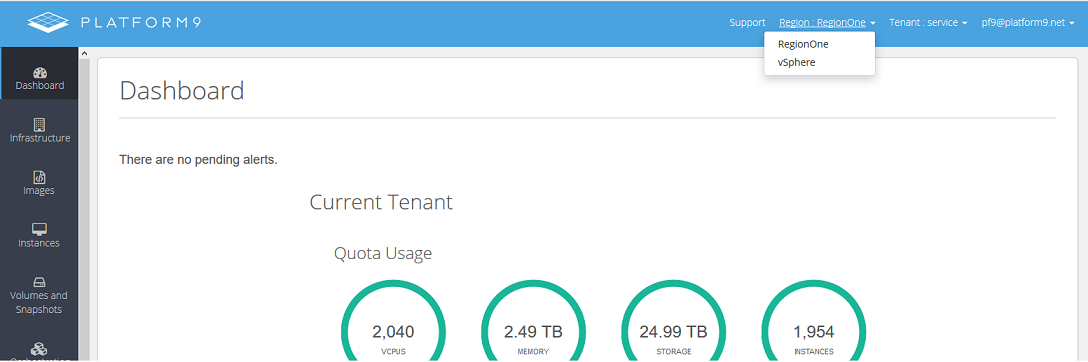
In version 1.5, users will notice a new menu at the top of the Platform9 user interface that allows them to select from a list of regions. Choosing a particular region gives them control over the resources managed by that region's services.
Note that hosts, images, instances, networks and cinder volumes are all secluded within the region. Resources from a particular region are only available when that region is selected.
**Regions and the Keystone Service Catalog**
When using the OpenStack command line clients, it's important to understand how regions help the clients (WebUI or command-line) locate the various services. The Keystone identity service assists with connection to cloud management services by maintaining a catalog of the endpoints for each of the other services. Each endpoint listed in the Keystone service catalog contains:
* The service type (compute, image, volume, orchestration etc)
* The service name (Nova, Glance, Cinder, Heat, etc)
* The name of the region in which the service operates.
* The HTTP REST endpoint URL.
Given the Keystone service catalog, a client can find a URL for the service and region he wishes to use.
In general, a client wishing to send a request to one of the management services follows this sequence:
* Connect to keystone and request an authentication token.
* Get the service catalog.
* Find the endpoint of the service in the desired region.
* Connect to the endpoint and make the request.
For multi-region clouds, when using the OpenStack command line clients, it will be necessary to include the region name in the command line. For example, to get a list of instances in region `williamsport-pa`, the Nova client must be invoked as follows:
{% tabs %}
{% tab title="OpenStack" %}
```bash
nova --os-region williamport-pa list
```
{% endtab %}
{% endtabs %}
This tells Nova to list the instances managed by the nova-api service in the `williamsport-pa` region. Other OpenStack command line clients have a similar command line setting to select the region for the call.
---
# Agent Instructions
This documentation is published with GitBook. GitBook is the documentation platform designed so that both humans and AI agents can read, navigate, and reason over technical content effectively. Learn more at gitbook.com.
## Querying This Documentation
If you need additional information that is not directly available in this page, you can query the documentation by asking a question.
Perform an HTTP GET request on the following URL with the `ask` and `goal` query parameters:
```
GET https://docs.platform9.com/managed-openstack/5.8/regions/regions-multiple-regions.md?ask=&goal=
```
`ask` is the immediate question: it should be specific, self-contained, and written in natural language.
`goal` is what the user is ultimately trying to achieve, the reason they need the answer. Sharing it helps GitBook give you a better, more relevant answer. A goal is most helpful when it describes the outcome the user wants rather than restating the question. For example, with `ask=how do I create an API token`, a goal like `automate deployments from our CI pipeline` lets GitBook tailor the answer to that use case.
The response will contain a direct answer to the question and relevant excerpts and sources from the documentation.
Use this mechanism when the answer is not explicitly present in the current page, you need clarification or additional context, or you want to retrieve related documentation sections.