> For the complete documentation index, see [llms.txt](https://docs.platform9.com/llms.txt). Markdown versions of documentation pages are available by appending `.md` to page URLs; this page is available as [Markdown](https://docs.platform9.com/managed-openstack/5.8/images/images-vmware-vm-catalog.md).
# Populate Image Catalog for VMware vSphere
There are two types of images supported with Platform9’s Managed OpenStack for VMware vSphere. You can use:
* VM Templates (automatically discovered from paired datastores)
* VMDK files (must be uploaded to the Glance image catalog using Glance API/CLI
### Using VM Templates
Using VMware templates for your images in Platform9 OpenStack image catalog is the easiest and most performant way of launching instances using Platform9, since templates are directly cloned at the vSphere layer, without involving overhead of extra copies via OpenStack Glance. To achieve this:
* Copy over any existing vSphere templates to one of the datastores paired with Platform9 Managed OpenStack compute.
* Once you do this, Platform9 template discovery will run within next 10 minutes (periodic intervals), and will discover and report these templates to the Glance service for use as OpenStack images.
* The templates will then appear in your Glance image catalog and can be viewed in the Images menu of Platform9 UI/queries via Glance API.
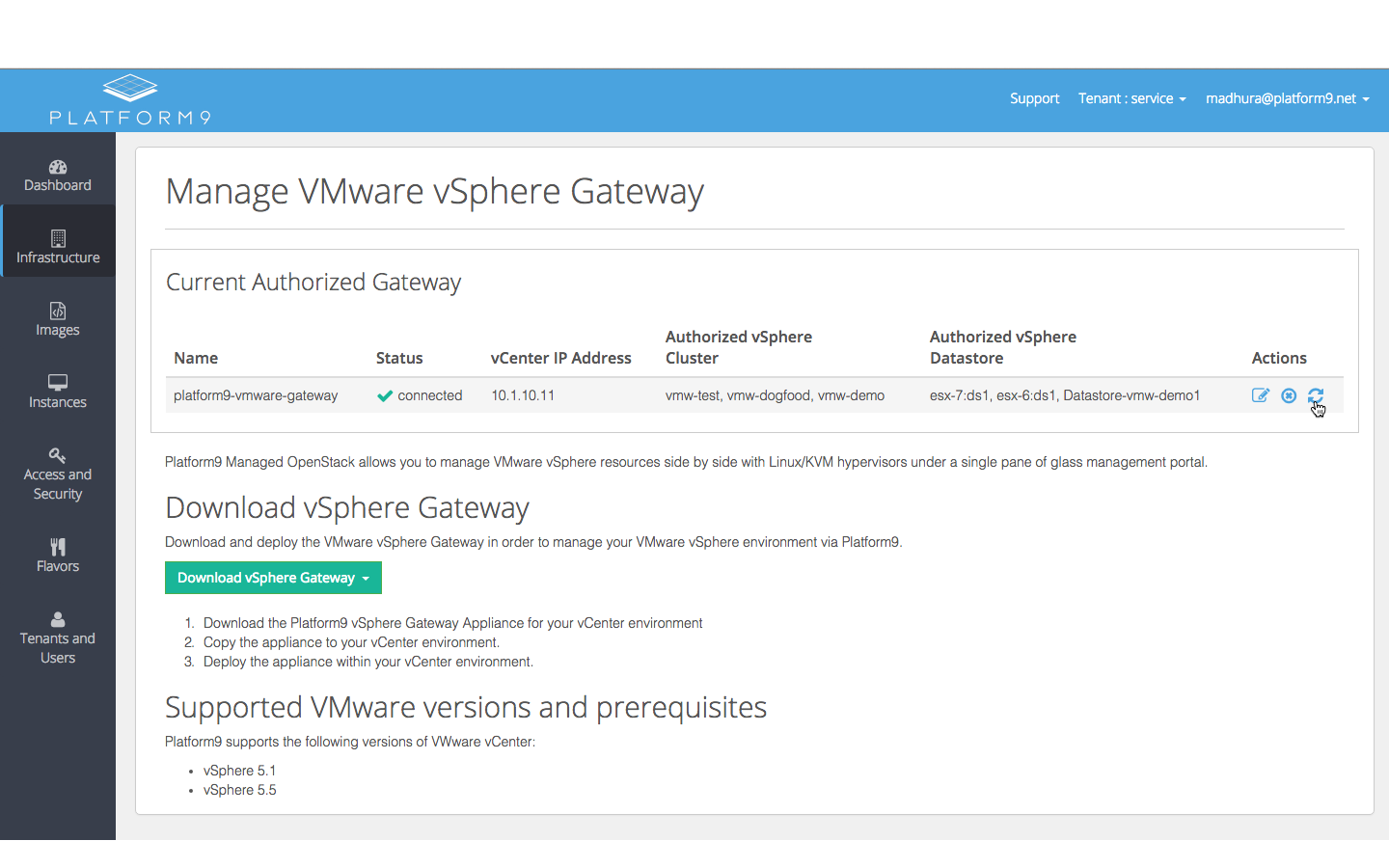
* If you’d like to trigger the template discovery immediately after copying templates to the datastores, this can be done by going to the “Manage VMware Gateway” page, and clicking on the “Refresh” icon, as shown in the screenshot below:
**Best Practices**
* It is a good practice to clear out existing NICs and CD-ROM drives attached to the template before using it as an OpenStack image, since the instance provisioning flow will attach its own networks, and also drives to pass in cloud-init metadata.
* The configuration for the template in terms of CPU, memory, disk size will be overridden based on the flavor chosen during instance provisioning.
* It is also recommended that templates have only one disk attached to them - this will get resized as needed, based on the flavor chosen during provisioning.
### Using VMDK Files
Unlike templates, Platform9 does not currently automatically discover VMDK files from the paired datastores. You need to upload vmdk files to the Glance Image catalog via the Glance APIs. More details can be found in the support article on [VMware Glance Datastore Support](/managed-openstack/5.8/images/images-vmware-glance.md).
---
# Agent Instructions
This documentation is published with GitBook. GitBook is the documentation platform designed so that both humans and AI agents can read, navigate, and reason over technical content effectively. Learn more at gitbook.com.
## Querying This Documentation
If you need additional information that is not directly available in this page, you can query the documentation by asking a question.
Perform an HTTP GET request on the following URL with the `ask` and `goal` query parameters:
```
GET https://docs.platform9.com/managed-openstack/5.8/images/images-vmware-vm-catalog.md?ask=&goal=
```
`ask` is the immediate question: it should be specific, self-contained, and written in natural language.
`goal` is what the user is ultimately trying to achieve, the reason they need the answer. Sharing it helps GitBook give you a better, more relevant answer. A goal is most helpful when it describes the outcome the user wants rather than restating the question. For example, with `ask=how do I create an API token`, a goal like `automate deployments from our CI pipeline` lets GitBook tailor the answer to that use case.
The response will contain a direct answer to the question and relevant excerpts and sources from the documentation.
Use this mechanism when the answer is not explicitly present in the current page, you need clarification or additional context, or you want to retrieve related documentation sections.