> For the complete documentation index, see [llms.txt](https://docs.platform9.com/llms.txt). Markdown versions of documentation pages are available by appending `.md` to page URLs; this page is available as [Markdown](https://docs.platform9.com/managed-openstack/5.8/volumes-and-snapshots/storage-integrate-lvm.md).
# Integrating OpenStack Cinder with LVM
This tutorial describes OpenStack Cinder integration with your local LVM storage.
Please also refer to [this article](/managed-openstack/5.8/volumes-and-snapshots/storage-cinder-integrations.md) for a general tutorial on Cinder integration with Platform9 Managed OpenStack.
### Prerequisites for OpenStack Cinder LVM Block Storage
The hypervisor that you choose to have Cinder role installed must have a logical volume group named “cinder-volumes”.
To create a new volume group if you do not have one, you will either need a free partition or you can use a separate hard drive/SSD for this.
Assuming /dev/sdb is the partition you want to use for Cinder LVM integration, run the following commands to create the new volume group:
{% tabs %}
{% tab title="Bash" %}
```bash
pvcreate /dev/sdb1 vgcreate cinder-volumes /dev/sdb1
```
{% endtab %}
{% endtabs %}
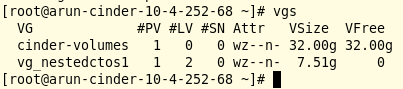
You can verify the volume group creation by using the `vgs`command that lists your existing volume groups.
### Integration LVM With Platform9 via Cinder Block Storage Integration
Once the required volume group is created, follow the [Supported Storage Integrations](/managed-openstack/5.8/volumes-and-snapshots/storage-cinder-integrations.md) tutorial to assign the Cinder role to appropriate hypervisor/host and select the LVM driver as part of the block storage configuration.
That's it! Your Cinder integration with your local LVM is done. You should now be able to start creating volumes and snapshots leveraging your local LVM.
## Configuring LVM for Thin Provisioning
You can create thin-provisioned volumes in LVM. You must enable thin provisioning to be able to create thin-provisioned volumes in LVM.
Follow the steps given below to enable thin provisioning.
1\. Create a file named **cinder\_override.conf** under the directory */opt/pf9/etc/pf9-cindervolume-base/conf.d/*.
{% tabs %}
{% tab title="Bash" %}
```bash
cd /opt/pf9/etc/pf9-cindervolume-base/conf.d/ touch cinder_override.conf
```
{% endtab %}
{% endtabs %}
{% hint style="info" %}
**Info**
**Note:** Valid values for target\_helper are ‘lioadm’ (CentOS hosts) and ‘tgtadm’ (Debian hosts).
{% endhint %}
2\. Under the backend-specific section, set `lvm_type = thin` and `target_helper = lioadm`.
{% tabs %}
{% tab title="cinder\_override.conf" %}
```yaml
[DEFAULT]
enabled_backends = lvm
[lvm]
lvm_type = thin
target_helper = lioadm
```
{% endtab %}
{% endtabs %}
3\. Restart the `pf9-cindervolume` service.
{% tabs %}
{% tab title="Bash" %}
```bash
service pf9-cindervolume-base restart
```
{% endtab %}
{% endtabs %}
Newly created LVM volumes would now utilize the thin provisioning storage allocation policy.
---
# Agent Instructions
This documentation is published with GitBook. GitBook is the documentation platform designed so that both humans and AI agents can read, navigate, and reason over technical content effectively. Learn more at gitbook.com.
## Querying This Documentation
If you need additional information that is not directly available in this page, you can query the documentation by asking a question.
Perform an HTTP GET request on the following URL with the `ask` and `goal` query parameters:
```
GET https://docs.platform9.com/managed-openstack/5.8/volumes-and-snapshots/storage-integrate-lvm.md?ask=&goal=
```
`ask` is the immediate question: it should be specific, self-contained, and written in natural language.
`goal` is what the user is ultimately trying to achieve, the reason they need the answer. Sharing it helps GitBook give you a better, more relevant answer. A goal is most helpful when it describes the outcome the user wants rather than restating the question. For example, with `ask=how do I create an API token`, a goal like `automate deployments from our CI pipeline` lets GitBook tailor the answer to that use case.
The response will contain a direct answer to the question and relevant excerpts and sources from the documentation.
Use this mechanism when the answer is not explicitly present in the current page, you need clarification or additional context, or you want to retrieve related documentation sections.