> For the complete documentation index, see [llms.txt](https://docs.platform9.com/llms.txt). Markdown versions of documentation pages are available by appending `.md` to page URLs; this page is available as [Markdown](https://docs.platform9.com/managed-openstack/5.8/images/images-vmware-glance.md).
# Use vSphere Datastore as backing for Image Catalog
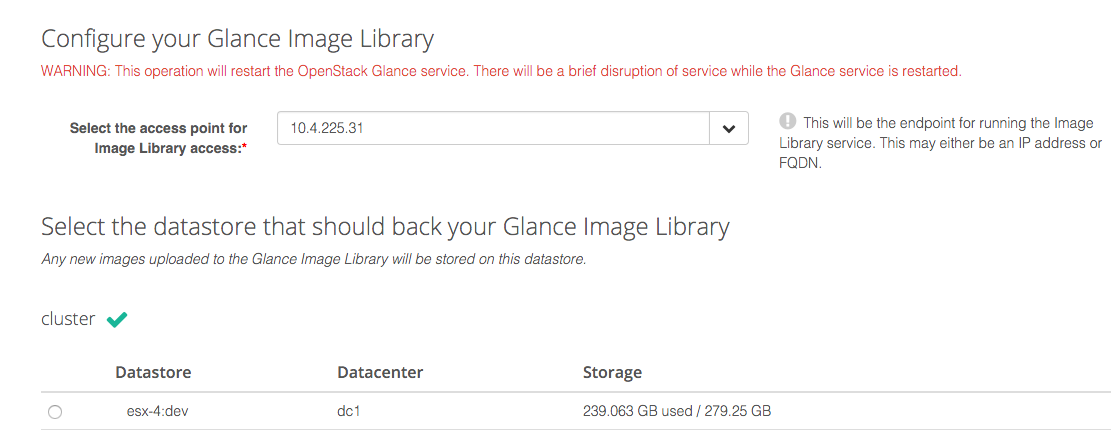
This Tutorial describes steps required for setting up a vSphere Datastore as a backing for your OpenStack Glance Image Catalog in Platform9 Managed OpenStack.
### Set Up OpenStack Glance:
* Enabling Glance datastore feature requires authorization of VMware gateway by specifying the datastore and appliance IP that should to be paired with Platform9 Glance.
* Exactly one datastore can be paired with Platform9 Glance.
* Any glance commands **must** be executed from a machine that can access the gateway.
### How it Works:
Once the initial setup is complete, all Glance operations will use the VMware datastore as the backend.
* Templates, however will be discovered based on the datastores paired with Nova.
* Image upload to the datastore is an HTTP PUT on the datastore directly and does not invoke any vCenter operation.
* Datastores paired with Nova Compute and Glance need not be the same.
* All glance images can be found at `/pf9/openstack_glance` path on the Glance datastore.
### Using OpenStack Glance Command Line:
Glance command line client can be used to perform image operations to datastores. Below are few examples.
* **Creating an image:** Two Platform9 specific properties need to be specified for the uploading the image, ie., pf9\_virtual\_size and pf9\_description. pf9\_virtual\_size is the virtual size of the image and pf9\_description is optional. Additionally, the property `vmware_ostype` should be specified correctly, especially for Windows OSes. You can refer to the list of supported VMware OS types [here](https://www.vmware.com/support/developer/vc-sdk/visdk2xpubs/ReferenceGuide/vim.vm.GuestOsDescriptor.GuestOsIdentifier.html). If you have more than one (1) region in your Platform9 deployment, you will also need to specify the region via the `--os-region-name` parameter.
{% tabs %}
{% tab title="OpenStack" %}
```bash
glance image-create \
[--os-region-name ] \
--name cirros \
--file /path/to/image/filename.vmdk \
--container-format=bare \
--disk-format=vmdk \
--property vmware_disktype="preallocated" \
--property vmware_adaptertype="ide" \
--property pf9_virtual_size="40894464" \
--property vmware_ostype="otherGuest64" \
--property pf9_description="glance cmdline image upload"
```
{% endtab %}
{% endtabs %}
**List Images**:
{% tabs %}
{% tab title="OpenStack" %}
```bash
glance image-delete
```
{% endtab %}
{% endtabs %}
**Display properties of an image**:
{% tabs %}
{% tab title="OpenStack" %}
```bash
glance image-delete
```
{% endtab %}
{% endtabs %}
**Delete image:**
{% tabs %}
{% tab title="OpenStack" %}
```bash
glance image-delete
```
{% endtab %}
{% endtabs %}
---
# Agent Instructions
This documentation is published with GitBook. GitBook is the documentation platform designed so that both humans and AI agents can read, navigate, and reason over technical content effectively. Learn more at gitbook.com.
## Querying This Documentation
If you need additional information that is not directly available in this page, you can query the documentation by asking a question.
Perform an HTTP GET request on the following URL with the `ask` and `goal` query parameters:
```
GET https://docs.platform9.com/managed-openstack/5.8/images/images-vmware-glance.md?ask=&goal=
```
`ask` is the immediate question: it should be specific, self-contained, and written in natural language.
`goal` is what the user is ultimately trying to achieve, the reason they need the answer. Sharing it helps GitBook give you a better, more relevant answer. A goal is most helpful when it describes the outcome the user wants rather than restating the question. For example, with `ask=how do I create an API token`, a goal like `automate deployments from our CI pipeline` lets GitBook tailor the answer to that use case.
The response will contain a direct answer to the question and relevant excerpts and sources from the documentation.
Use this mechanism when the answer is not explicitly present in the current page, you need clarification or additional context, or you want to retrieve related documentation sections.