> For the complete documentation index, see [llms.txt](https://docs.platform9.com/llms.txt). Markdown versions of documentation pages are available by appending `.md` to page URLs; this page is available as [Markdown](https://docs.platform9.com/private-cloud-director/2026.1/kubernetes-clusters/kubernetes-operating-system-image-management.md).
# Operating System Image Management
space.vars.product\_acronym Kubernetes allows the flexibility to use your own Operating System (OS) to use with your Kubernetes clusters. It requires Cluster API compliant operating system Images uploaded into the [Image Library](/private-cloud-director/2026.1/images-and-image-library/image-library---images.md) specific to the Kubernetes version you want to deploy. The ability to bring your own OS to space.vars.product\_acronym gives you more control over dependencies in your environment and ensures compatibility with your existing applications. The OS you bring can be commercial or an open source distribution.
## Building OS image
You can use [OpenstackImageBuilder](https://image-builder.sigs.k8s.io/capi/providers/openstack) based on the [KubernetesImageBuilder](https://image-builder.sigs.k8s.io/introduction.html) to create your own OS images on your machine. space.vars.product\_acronym currently supports **Ubuntu 22.04** and **Ubuntu 24.04** as the OS for worker nodes and **qcow2** as the image format.
**Pre-requisites**: A Ubuntu 22.04 machine (server or VM with nested virtualization enabled) with required dependencies installed, including qemu and libvirt, as the Kubernetes Image Builder creates a local virtual machine and installs Kubernetes before packaging the VM as a qcow2 image file.
{% tabs %}
{% tab title="Bash" %}
```bash
apt install make jq unzip qemu-kvm libvirt-daemon-system libvirt-clients virtinst cpu-checker libguestfs-tools libosinfo-bin
```
{% endtab %}
{% endtabs %}
Steps:
{% tabs %}
{% tab title="Bash" %}
```bash
git clone https://github.com/kubernetes-sigs/image-builder.git
cd image-builder
make deps-qemu
PACKER_LOG=1 make build-qemu-ubuntu-2204
```
{% endtab %}
{% endtabs %}
Note: Looking at the output from `make deps-qemu`, if a warning is shown about installed components not being on the path, take note of the directory shown in the warning, and add it to the path using the following command.
{% tabs %}
{% tab title="Bash" %}
```bash
export PATH=$PATH:
```
{% endtab %}
{% endtabs %}
{% tabs %}
{% tab title="Example" %}
```bash
export PATH=$PATH:/root/local/.bin
```
{% endtab %}
{% endtabs %}
{% hint style="info" %}
**Info**
It is OK to repeatedly run `make deps-qemu` until it completes successfully.
{% endhint %}
The OS and its supported versions are defined in `images/capi/packer/qemu/`. Any modifications to the `build-qemu` command for building different OS versions can also be found there.
By default the image-builder will use the latest Kubernetes version. To build a specific Kubernetes version, update the version details in `image-builder/images/capi/packer/config/kubernetes.json` and run the `make build` command again.
{% tabs %}
{% tab title="Bash" %}
```bash
# cat image-builder/images/capi/packer/config/kubernetes.json
{
"crictl_arch": "amd64",
"crictl_sha256": "https://github.com/kubernetes-sigs/cri-tools/releases/download/v%7B%7Buser crictl_version}}/crictl-v{{user crictl_version}}-linux-{{user crictl_arch}}.tar.gz.sha256",
"crictl_source_type": "pkg",
"crictl_url": "https://github.com/kubernetes-sigs/cri-tools/releases/download/v%7B%7Buser crictl_version}}/crictl-v{{user crictl_version}}-linux-{{user crictl_arch}}.tar.gz",
"crictl_version": "1.29.0",
"kubeadm_template": "etc/kubeadm.yml",
"kubernetes_apiserver_port": "6443",
"kubernetes_container_registry": "GitHub - kubernetes/registry.k8s.io: This project is the repo for registry.k8s.io, the production OCI registry service for Kubernetes' container image artifacts ",
"kubernetes_deb_gpg_key": "https://pkgs.k8s.io/core:/stable:/{{ user kubernetes_series }}/deb/Release.key",
"kubernetes_deb_repo": "https://pkgs.k8s.io/core:/stable:/{{ user kubernetes_series }}/deb/",
"kubernetes_deb_version": "v1.29.11-1.1",
"kubernetes_goarch": "amd64",
"kubernetes_http_source": "https://dl.k8s.io/release",
"kubernetes_load_additional_imgs": "false",
"kubernetes_rpm_gpg_check": "True",
"kubernetes_rpm_gpg_key": "https://pkgs.k8s.io/core:/stable:/{{ user kubernetes_series }}/rpm/repodata/repomd.xml.key",
"kubernetes_rpm_repo": "https://pkgs.k8s.io/core:/stable:/{{ user kubernetes_series }}/rpm/",
"kubernetes_rpm_repo_arch": "x86_64",
"kubernetes_rpm_version": "v1.29.11",
"kubernetes_semver": "v1.29.11",
"kubernetes_series": "v1.29",
"kubernetes_source_type": "pkg",
"systemd_prefix": "/usr/lib/systemd",
"sysusr_prefix": "/usr",
"sysusrlocal_prefix": "/usr/local"
}
```
{% endtab %}
{% endtabs %}
## Uploading OS Images to space.vars.product\_name [Image Library](/private-cloud-director/2026.1/images-and-image-library/image-library---images.md)
You can user the space.vars.product\_acronym UI or the CLI to upload an image to the [Image Library and Images](/private-cloud-director/2026.1/images-and-image-library/image-library---images.md) in space.vars.product\_acronym. Please follow the instructions in the [Image Library and Images](/private-cloud-director/2026.1/images-and-image-library/image-library---images.md) to import the generated qcow2 image into space.vars.product\_acronym.
## Adding required Properties to OS Images
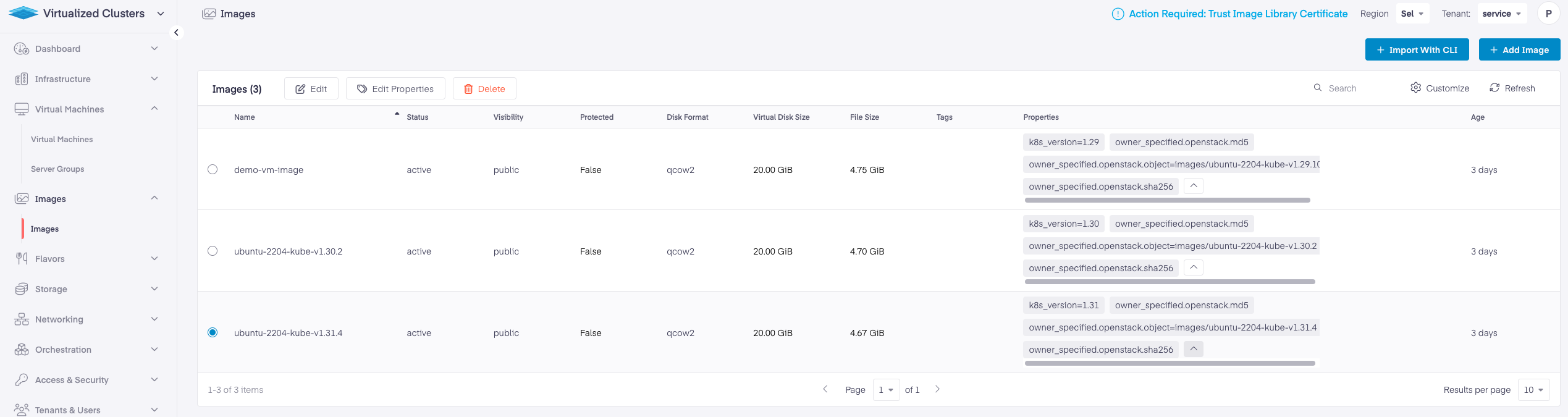
space.vars.product\_name requires following properties to be present on the image to be used for creating Kubernetes Node VMs. These are required to identify the image build for a specific Kubernetes version.
| Property Key | Property Value |
| ------------- | ------------------------------------------------------------------------ |
| `k8s_version` | Kubernetes version in formation major.minor version. Eg `1.31` or `1.32` |
You can add the image property after the image is imported via the space.vars.product\_acronym UI. Go to the Virtualized Cluster > Images Page and select the image to add properties. Click on Edit Properties to add the desired key:value properties. Once the Properties are added, the image's properties should appear, as the example below.
---
# Agent Instructions
This documentation is published with GitBook. GitBook is the documentation platform designed so that both humans and AI agents can read, navigate, and reason over technical content effectively. Learn more at gitbook.com.
## Querying This Documentation
If you need additional information that is not directly available in this page, you can query the documentation by asking a question.
Perform an HTTP GET request on the following URL with the `ask` and `goal` query parameters:
```
GET https://docs.platform9.com/private-cloud-director/2026.1/kubernetes-clusters/kubernetes-operating-system-image-management.md?ask=&goal=
```
`ask` is the immediate question: it should be specific, self-contained, and written in natural language.
`goal` is what the user is ultimately trying to achieve, the reason they need the answer. Sharing it helps GitBook give you a better, more relevant answer. A goal is most helpful when it describes the outcome the user wants rather than restating the question. For example, with `ask=how do I create an API token`, a goal like `automate deployments from our CI pipeline` lets GitBook tailor the answer to that use case.
The response will contain a direct answer to the question and relevant excerpts and sources from the documentation.
Use this mechanism when the answer is not explicitly present in the current page, you need clarification or additional context, or you want to retrieve related documentation sections.