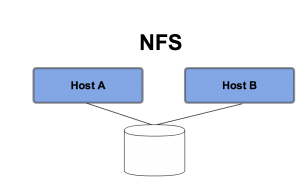
Figure 2: Ephemeral Disk with NFS
space.vars.product\_name . Virtual machines using this storage option are created with one ephemeral disk which is used to run the VM guest operating system and boot partition.
An ephemeral disk is deleted when the virtual machine is deleted. Ephemeral disks are often used with cloud native applications where VMs are expected to be short-lived and the data does not need to persist beyond the life of a given VM.
An Administrator makes ephemeral storage available to space.vars.product\_name by allocating either local storage on a hypervisor or NFS shared storage volume mounted on a hypervisor as the default storage location for virtual machines. This is typically done while onboarding a new hypervisor to space.vars.product\_name.
### Ephemeral Disks w/ Local Storage
Ephemeral disks are typically created using the local/direct-attached storage of the hypervisor node. The storage can be only be accessed by the compute node running on that host server and the VMs it hosts.
### Ephemeral Disks w/ NFS
Another option for Ephemeral storage is to host them on external storage via an **NFS mount**. In this case, the data is still purged when the VM using that the virtual disk on the file share is deleted. However, using an NFS mount for the VM root disk does allow for **simpler VM migration** since multiple compute nodes can be given access to the same file share. This method also allows for recovery of VMs when a hypervisor crashes or dies, as long as the NFS mount is accessible to at least one other hypervisor node.
Figure 2: Ephemeral Disk with NFS
space.vars.product\_name placement engine finds the appropriate hypervisor to place the VM on, the image file is copied over to the local storage of the hypervisor where it's cached for future use. A VM is then created usually by spawning a delta disk from the image's base disk.
## Comparison of Ephemeral vs Block Storage
Following table provides a comparison between space.vars.product\_name ephemeral vs block storage.
| | | **Ephemeral Storage** | **Block Storage** |
| ---------------------------- | - | -------------------------------------------------------------------------------------------------------------------------------------------------------------------------------------------------------------------------------------------------------- | -------------------------------------------------------------------------------------------------------------------------------------------------------------------------------------------------------------------------------------------------------------------------------------------------------------------------------------------------------------------------------------------------------------- |
| **Used to** | | Run Operating System and scratch space | Store persistent data on devices accessed as hard drives |
| **Accessed through** | | A file system | A block device |
| **Accessible** | | With a VM | With a VM |
| **Managed by** | | space.vars.product\_name Compute Service | space.vars.product\_name Block Storage Service |
| **Persists until** | | VM is deleted. VM root disk is deleted when the VM gets deleted. | Volume is deleted. Even when the VM gets deleted, the volume persists until explicitly deleted. |
| **Sizing determined by** | | Administrator configures size settings as part of [VM Flavors](/private-cloud-director/2025.4/virtualized-clusters/deploying-workloads.md#vm-flavors). Limited by local storage available on hypervisors. | Specified by user as part of volume creation |
| **Multiple disks in a VM** | | Adding multiple ephemeral disks to a VM is not supported. | You can have multiple volumes mounted on a VM. |
| **Example of typical usage** | | 10GB first disk, 30GB second disk | 1 TB block storage volume |
| **Advantages** | | - Simple - Out of box and easy to use for end-users
- Cheap and easy to provision for Administrators - provided using
local storage (or NFS shared storage) available to hypervisor.
- Allows for advance tiering of storage - by creating key-
value pair metadata with the block storage endpoint.
- Can dynamically resize block storage volumes (even after allocating to a VM)
- Can add multiple volumes to a VM.
- Can pass Quality-of-Service metadata to the storage controller to get required
IOPs for the storage volume (assuming support by the Cinder plugin).
- Does not support advance features like resizing the disk once created
- Adding multiple ephemeral disks to a VM is not supported.
- No ability to associate Quality of Service metadata with VM disk
- No support for Storage Tiering.
space.vars.product\_name enables persistent block storage volumes, and is one of the most important and popular space.vars.product\_name storage options. space.vars.product\_name block storage service provides VMs with block storage volumes that persist even when the VMs they are attached to are deleted.
{% hint style="info" %}
**Info**
A single block volume can **only be attached to a single VM** at a given time, but provides the flexibility to be detached from one VM and attached to another.
{% endhint %}
Block storage is compatible with VM live migration, in that data volumes get moved as needed when doing a VM migration.
Advantages of block storage:
* If for some reason you need to delete and relaunch a virtual machine, you can keep any non-disposable data on the block storage volumes and re-attached them to the new VM.
* If a hypervisor node crashes, you can launch VMs on surviving hypervisors and attach block storage volumes to those VMs with the data intact.
* You can resize and extend a block storage volume if you need to grow the capacity of a disk being used by a VM.
* Using a dedicated storage node or storage subsystem to host volumes, capacity can be provided that is greater than what is available via the direct-attached storage in the compute nodes (Note that is also true if using NFS with shared storage but without data persistence).
* You can leverage specific enterprise storage features such as thin-provisioning, tiering, Quality of Service, etc. when using space.vars.product\_name block storage.
* A block storage volume can be used as the boot disk for a virtual machine; in that scenario, an ephemeral disk is not required.
---
# Agent Instructions
This documentation is published with GitBook. GitBook is the documentation platform designed so that both humans and AI agents can read, navigate, and reason over technical content effectively. Learn more at gitbook.com.
## Querying This Documentation
If you need additional information that is not directly available in this page, you can query the documentation by asking a question.
Perform an HTTP GET request on the following URL with the `ask` and `goal` query parameters:
```
GET https://docs.platform9.com/private-cloud-director/2025.4/storage/storage-overview1sq.md?ask=