> For the complete documentation index, see [llms.txt](https://docs.platform9.com/llms.txt). Markdown versions of documentation pages are available by appending `.md` to page URLs; this page is available as [Markdown](https://docs.platform9.com/managed-openstack/getting-started/rocky-setup/preparing-rocky-server-for-openstack-neutron.md).
# Prepare Rocky Server
This article describes how prepare a Rocky physical server to be added as a host to Platform9 Managed OpenStack (PMO) cloud.
{% hint style="info" %}
**Note**
For a description of PMO networking concepts, refer to the [Networking Concepts](/managed-openstack/networks/networks-networking-concepts.md). Refer to [System Requirements for Linux-KVM](/managed-openstack/getting-started/generic-linux-kvm-setup/getting-started-prerequisites-linux-kvm.md) for systems requirements and supported Rocky Operating System versions.
{% endhint %}
### Supported Operating System Version
Platform9 Managed OpenStack supports Rocky 9.1 (64-bit).
### Step 1 - Install Rocky Operating System and install some pre-requisite packages
Make sure that your server is configured appropriately with access to storage and physical networking. Download and install Rocky on your physical server. You can download Rocky distributions from here: [https://rockylinux.org/download/](http://wiki.centos.org/Download)
{% hint style="info" %}
**Note**
We recommend installing the minimal Rocky operating system. Platform9 agents are prepared to pull in any required package dependencies and get them installed on your server to prepare it to be part of OpenStack. This includes any libvirt/KVM package dependencies.
{% endhint %}
It’s usually a good practice to get your system up to date with regard to the latest patches and updates.
{% tabs %}
{% tab title="Bash" %}
```bash
sudo dnf install -y tar
sudo dnf install -y yum wget vim net-tools python3-libselinux sshpass nfs-utils
sudo dnf install initscripts.x86_64 initscripts-service.noarch python3-dnf-plugin-versionlock -y
sudo dnf upgrade --exclude=centos-release* --exclude=redhat-release* --exclude=kernel* --exclude=rocky-release* --exclude=rocky-repos* -y
sudo dnf install https://dl.fedoraproject.org/pub/epel/epel-release-latest-9.noarch.rpm -y
```
{% endtab %}
{% endtabs %}
### Step 2 - Ensure Virtualization is Enabled
Ensure that virtualization is enabled for your server by checking your server’s BIOS settings. If disabled, enable virtualization for the server to be able to act as a hypervisor within Platform9 Managed OpenStack.
### Step 3 - Ensure the System Clock is Synchronized
{% tabs %}
{% tab title="Bash" %}
```bash
sudo dnf install -y chrony
sudo systemctl enable chronyd.service
sudo systemctl start chronyd.service
```
{% endtab %}
{% endtabs %}
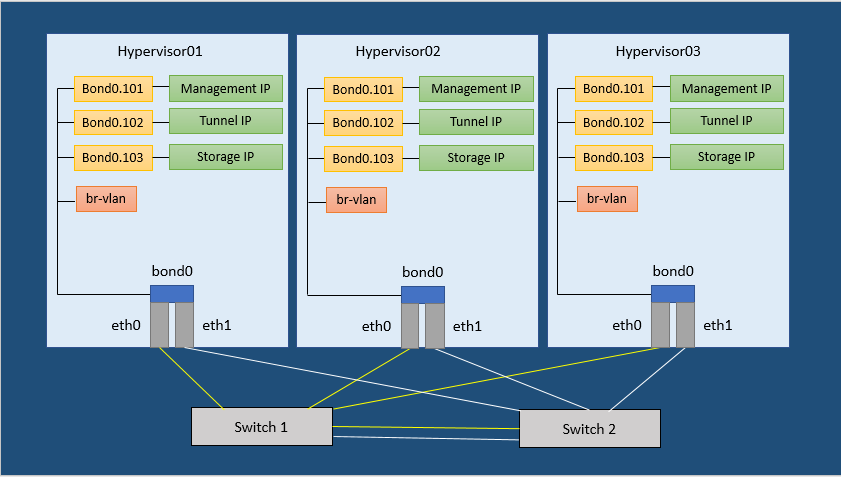
The following image (Figure 1) represents three hypervisors connected in a Managed OpenStack Neutron network.
{% hint style="info" %}
**Note**
There are no separate network nodes in a Distributed Virtual Routing (DVR) network.
{% endhint %}
### Step 4 - Set SELinux to permissive and update crypto policies to legacy mode
This is required for Open vSwitch (OVS) to be able to manage networking.
Run the following commands to set SELinux to permissive and to change crypto policy to legacy on rocky hosts to allow key type `ssh-rsa` and reboot.
{% tabs %}
{% tab title="Bash" %}
```bash
sudo sed -i s/SELINUX=enforcing/SELINUX=permissive/g /etc/selinux/config
sudo setenforce 0
sudo update-crypto-policies --set LEGACY
sudo reboot
```
{% endtab %}
{% endtabs %}
### Step 5 - Add the Openvswitch YUM Repo
Run the following command to install the Openvswitch YUM repository.
{% tabs %}
{% tab title="Bash" %}
```bash
sudo dnf install -y centos-release-openstack-yoga.noarch
```
{% endtab %}
{% endtabs %}
For Platform9 releases upto and including 4.4:
### Step 6 - Install Openvswitch and openstack-network-scripts packages
Run the following command to install Openvswitch and then remove the repos to prevent an upgrade later.
{% tabs %}
{% tab title="Bash" %}
```bash
sudo dnf install -y openvswitch2.17.x86_64 openstack-network-scripts-openvswitch2.17.x86_64
sudo dnf versionlock add openvswitch2.17
```
{% endtab %}
{% endtabs %}
### Step 7 - Disable Firewalld and NetworkManager
This is required for KVM and OVS to be able to create iptables rules directly without firewalld getting in the way.
Run the following commands to disable firewalld and NetworkManager.
{% tabs %}
{% tab title="Bash" %}
```bash
sudo systemctl disable firewalld
sudo systemctl stop firewalld
sudo systemctl disable NetworkManager
sudo systemctl stop NetworkManager
```
{% endtab %}
{% endtabs %}
### Step 8 - Enable Network and Openvswitch
Run the following command to enable network.
{% tabs %}
{% tab title="Bash" %}
```bash
sudo systemctl enable network
sudo systemctl enable openvswitch
sudo systemctl start openvswitch
```
{% endtab %}
{% endtabs %}
### Step 9 - Load the modules needed for Neutron
Run the following commands to load the modules needed for Neutron as root.
{% tabs %}
{% tab title="Bash" %}
```bash
modprobe bridge
modprobe 8021q
modprobe bonding
modprobe tun
modprobe br_netfilter
echo bridge > /etc/modules-load.d/pf9.conf
echo 8021q >> /etc/modules-load.d/pf9.conf
echo bonding >> /etc/modules-load.d/pf9.conf
echo tun >> /etc/modules-load.d/pf9.conf
echo br_netfilter >> /etc/modules-load.d/pf9.conf
```
{% endtab %}
{% endtabs %}
### Step 10 - Add sysctl options
Run the following commands to add sysctl options as root.
{% tabs %}
{% tab title="Bash" %}
```bash
echo net.ipv4.conf.all.rp_filter=0 >> /etc/sysctl.conf
echo net.ipv4.conf.default.rp_filter=0 >> /etc/sysctl.conf
echo net.bridge.bridge-nf-call-iptables=1 >> /etc/sysctl.conf
echo net.ipv4.ip_forward=1 >> /etc/sysctl.conf
echo net.ipv4.tcp_mtu_probing=2 >> /etc/sysctl.conf
sysctl -p
```
{% endtab %}
{% endtabs %}
### Step 11 - Install QEMU KVM EV
Run the following commands to install QEMU KVM EV
{% tabs %}
{% tab title="Bash" %}
```bash
sudo dnf install qemu-kvm -y
```
{% endtab %}
{% endtabs %}
### Step 12 - Install Router Advertisement Daemon
Run the following command to install radvd
{% tabs %}
{% tab title="Bash" %}
```bash
sudo dnf -y install radvd
```
{% endtab %}
{% endtabs %}
### Step 13 - Configure host networking
Please refer [Prepare CentOS Server](/managed-openstack/getting-started/centos-setup/preparing-centos-preparing-centos-server-for-neutron.md) for setting up host networking.
At this point your Rocky server is ready to be added as a hypervisor to Platform9 Managed OpenStack (PMO).
---
# Agent Instructions
This documentation is published with GitBook. GitBook is the documentation platform designed so that both humans and AI agents can read, navigate, and reason over technical content effectively. Learn more at gitbook.com.
## Querying This Documentation
If you need additional information that is not directly available in this page, you can query the documentation by asking a question.
Perform an HTTP GET request on the following URL with the `ask` and `goal` query parameters:
```
GET https://docs.platform9.com/managed-openstack/getting-started/rocky-setup/preparing-rocky-server-for-openstack-neutron.md?ask=&goal=
```
`ask` is the immediate question: it should be specific, self-contained, and written in natural language.
`goal` is what the user is ultimately trying to achieve, the reason they need the answer. Sharing it helps GitBook give you a better, more relevant answer. A goal is most helpful when it describes the outcome the user wants rather than restating the question. For example, with `ask=how do I create an API token`, a goal like `automate deployments from our CI pipeline` lets GitBook tailor the answer to that use case.
The response will contain a direct answer to the question and relevant excerpts and sources from the documentation.
Use this mechanism when the answer is not explicitly present in the current page, you need clarification or additional context, or you want to retrieve related documentation sections.