> For the complete documentation index, see [llms.txt](https://docs.platform9.com/llms.txt). Markdown versions of documentation pages are available by appending `.md` to page URLs; this page is available as [Markdown](https://docs.platform9.com/managed-openstack/getting-started/rhel-setup/preparing-preparing-rhel.md).
# Prepare a RHEL Server
This article describes how prepare a RHEL Linux server to be added as a host to Platform9 Managed OpenStack (PMO).
{% hint style="info" %}
**Info**
For a description of PMO networking concepts, refer to the [Networking Basic Concepts tutorial](/managed-openstack/networks/networks-networking-concepts.md). Refer to [PMO prerequisites for Linux/KVM](/managed-openstack/getting-started/generic-linux-kvm-setup/getting-started-prerequisites-linux-kvm.md) for systems requirements and supported Ubuntu Operating System versions.
{% endhint %}
### Supported Operating System Version
Platform9 Managed OpenStack supports RHEL versions 7.x and above.
### Step 1 - Install RHEL Operating System
Make sure that your server is configured appropriately with access to storage and physical networking. Download and install RHEL 7.6 on your physical server. You can download RHEL distributions from here: [RedHat Software](https://access.redhat.com/downloads)
{% hint style="info" %}
**IMPORTANT**
We recommend installing the minimal RHEL operating system. Platform9 agents are prepared to pull in any required package dependencies and get them installed on your server to prepare it to be part of OpenStack. This includes any libvirt/KVM package dependencies.
{% endhint %}
It’s usually a good practice to get your system up to date with regard to the latest patches and updates.
{% tabs %}
{% tab title="Bash" %}
```bash
sudo yum -y update
```
{% endtab %}
{% endtabs %}
### Step 2 - Register the RHEL server and Subscribe to Red Hat Customer Portal
Run the following commands to register and attach the RHEL server to the Red Hat Customer Portal for updates, and enable the “server-optional” RPM repository.
{% tabs %}
{% tab title="Bash" %}
```bash
subscription-manager register
subscription-manager attach
subscription-manager repos —enable=rhel-7-server-optional-rpms
```
{% endtab %}
{% endtabs %}
### Step 3 - Ensure Virtualization is Enabled
Ensure that virtualization is enabled for your server by checking your server’s BIOS settings. If disabled, enable virtualization for the server to be able to act as a hypervisor within Platform9 Managed OpenStack.
### Step 4 - Install, Enable And Start the NTP Daemon.
This is required for all components to have their time synchronized.
{% tabs %}
{% tab title="Bash" %}
```bash
yum install -y ntp
systemctl enable ntpd
systemctl start ntpd
```
{% endtab %}
{% endtabs %}
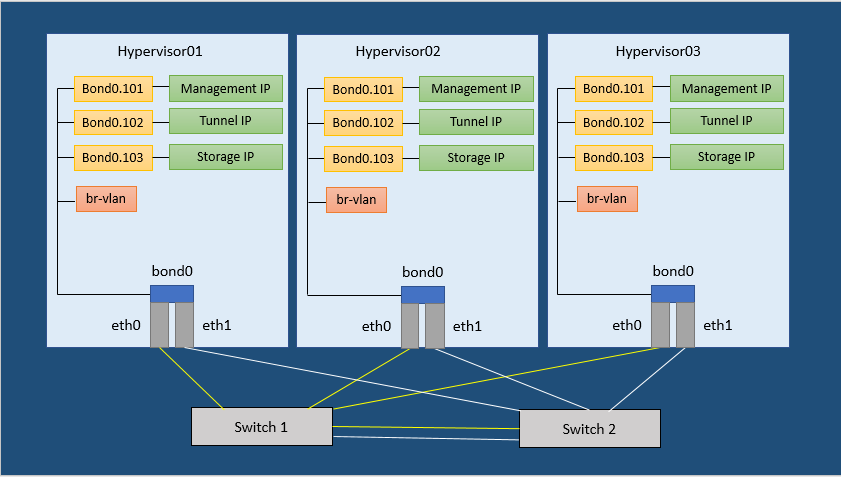
### Step 5 - Configure Networking
PMO supports configuring your networking in two ways:
* Setup one or more dedicated networking servers to handle your networking.
* Setup Distributed Virtual Networking (DVR) and make each host a network host.
Figure 1. Neutron Network Configuration Example
### Step 6 - Set SELinux to permissive
This is required for Open vSwitch (OVS) to be able to manage networking
{% tabs %}
{% tab title="Bash" %}
```bash
sed -i s/SELINUX=enforcing/SELINUX=permissive/g /etc/selinux/config
setenforce 0
```
{% endtab %}
{% endtabs %}
### Step 7 - Disable Firewalld and NetworkManager
This is required for KVM and OVS to be able to create iptables rules directly without Firewalld getting in the way.
{% tabs %}
{% tab title="Bash" %}
```bash
systemctl disable firewalld
systemctl stop firewalld
```
{% endtab %}
{% endtabs %}
{% tabs %}
{% tab title="Bash" %}
```bash
systemctl disable NetworkManager
systemctl stop NetworkManager
```
{% endtab %}
{% endtabs %}
### Step 8 - Enable Network
{% tabs %}
{% tab title="Bash" %}
```bash
systemctl enable network
```
{% endtab %}
{% endtabs %}
### Step 9 - Load the modules needed for Neutron
{% tabs %}
{% tab title="Bash" %}
```bash
modprobe bridge
modprobe 8021q
modprobe bonding
modprobe br_netfilter
echo bridge > /etc/modules-load.d/pf9.conf
echo 8021q >> /etc/modules-load.d/pf9.conf
echo bonding >> /etc/modules-load.d/pf9.conf
echo br_netfilter >> /etc/modules-load.d/pf9.conf
```
{% endtab %}
{% endtabs %}
### Step 10 - Add sysctl options
{% tabs %}
{% tab title="Bash" %}
```bash
echo net.ipv4.conf.all.rp_filter=0 >> /etc/sysctl.conf
echo net.ipv4.conf.default.rp_filter=0 >> /etc/sysctl.conf
echo net.bridge.bridge-nf-call-iptables=1 >> /etc/sysctl.conf
echo net.ipv4.ip_forward=1 >> /etc/sysctl.conf
echo net.ipv4.tcp_mtu_probing=2 >> /etc/sysctl.conf
sysctl -p
```
{% endtab %}
{% endtabs %}
### Step 11 - Add the Platform9 YUM Repo
Run the following command to install the Platform9 YUM repository.
For Platform9 releases up to and including 4.4:
{% tabs %}
{% tab title="Bash" %}
```bash
yum -y install https://s3-us-west-1.amazonaws.com/platform9-neutron/noarch/platform9-neutron-repo-1-0.noarch.rpm
```
{% endtab %}
{% endtabs %}
For Platform9 releases from 4.5 onwards:
{% tabs %}
{% tab title="Bash" %}
```bash
yum -y install https://s3-us-west-1.amazonaws.com/platform9-neutron/noarch/platform9-neutron-repo.noarch.rpm
```
{% endtab %}
{% endtabs %}
### Step 12 - Install Open vSwitch
{% tabs %}
{% tab title="Bash" %}
```bash
yum -y install --disablerepo="*" --enablerepo="platform9-neutron-repo" openvswitch
```
{% endtab %}
{% endtabs %}
### Step 13 - Enable and start Open vSwitch
{% tabs %}
{% tab title="Bash" %}
```bash
systemctl enable openvswitch
systemctl start openvswitch
```
{% endtab %}
{% endtabs %}
### Step 14 - Install QEMU KVM RHV
{% tabs %}
{% tab title="Bash" %}
```bash
yum install qemu-kvm-rhv
```
{% endtab %}
{% endtabs %}
### Step 15 - Install Router Advertisement Daemon
{% tabs %}
{% tab title="Bash" %}
```bash
yum -y install radvd
```
{% endtab %}
{% endtabs %}
### Step 16 - Configure physical interfaces
We are assuming eth0 and eth1. Please substitute your correct interface names. We are assuming an MTU of 9000 (VXLAN requires an MTU of at least 1600) Make sure all physical switches are configured to handle this MTU or you will have problems.
**/etc/sysconfig/network-scripts/ifcfg-eth0**
{% tabs %}
{% tab title="Bash" %}
```bash
DEVICE=eth0
ONBOOT=yes
BOOTPROTO=none
MTU=9000
MASTER=bond0
SLAVE=yes
```
{% endtab %}
{% endtabs %}
**/etc/sysconfig/network-scripts/ifcfg-eth1**
{% tabs %}
{% tab title="Bash" %}
```bash
DEVICE=eth1
ONBOOT=yes
BOOTPROTO=none
MTU=9000
MASTER=bond0
SLAVE=yes
```
{% endtab %}
{% endtabs %}
### Step 17 - Setup the Bond interface
We are assuming bonding type=4 (LACP) refer to [Bonding Types](https://wiki.centos.org/TipsAndTricks/BondingInterfaces) to learn more.
**/etc/sysconfig/network-scripts/ifcfg-bond0**
{% tabs %}
{% tab title="Bash" %}
```bash
DEVICE=bond0
ONBOOT=yes
TYPE=OVSPort
DEVICETYPE=ovs
OVS_BRIDGE=br-vlan
BONDING_MASTER=yes
BONDING_OPTS="mode=4"
MTU=9000
```
{% endtab %}
{% endtabs %}
### Step 18 - Setup the VLAN trunk Bridge
**/etc/sysconfig/network-scripts/ifcfg-br-vlan**
{% tabs %}
{% tab title="Bash" %}
```bash
DEVICE=br-vlan
BOOTPROTO=none
ONBOOT=yes
TYPE=OVSBridge
DEVICETYPE=ovs
```
{% endtab %}
{% endtabs %}
### Step 19 - Setup the Management interface
We are assuming VLAN 101 for the Management network. Please use your correct VLAN ID for your environment. We are assuming subnet 192.0.2.0/24 for Management. Please use your correct subnet.
**/etc/sysconfig/network-scripts/ifcfg-bond0.101**
{% tabs %}
{% tab title="Bash" %}
```bash
DEVICE=bond0.101
ONBOOT=yes
BOOTPROTO=none
TYPE=Vlan
VLAN=yes
IPADDR=192.0.2.10
NETMASK=255.255.255.0
GATEWAY=192.0.2.1
DNS1=192.0.2.100
DNS2=192.0.2.200
```
{% endtab %}
{% endtabs %}
### Step 20 - Setup the VXLAN/GRE tunneling interface (Optional)
We are assuming VLAN 102 for VXLAN/GRE tunneling. Please use your correct VLAN We are assuming subnet 198.51.100.0/24 for VXLAN/GRE tunneling. Please use your correct subnet.
**/etc/sysconfig/network-scripts/ifcfg-bond0.102**
{% tabs %}
{% tab title="Bash" %}
```bash
DEVICE=bond0.102
ONBOOT=yes
BOOTPROTO=none
TYPE=Vlan
VLAN=yes
IPADDR=198.51.100.10
NETMASK=255.255.255.0
```
{% endtab %}
{% endtabs %}
### Step 21 - Setup the External Interface and External Bridge
We are assuming VLAN 103 for the external network. Please use your correct VLAN.
**/etc/sysconfig/network-scripts/ifcfg-bond0.103**
{% tabs %}
{% tab title="Bash" %}
```bash
DEVICE=bond0.104
ONBOOT=yes
BOOTPROTO=none
TYPE=Vlan
VLAN=yes
IPADDR=203.0.113.10
NETMASK=255.255.255.0
```
{% endtab %}
{% endtabs %}
**/etc/sysconfig/network-scripts/ifcfg-br-ext**
{% tabs %}
{% tab title="Bash" %}
```bash
DEVICE=bond0.104
ONBOOT=yes
BOOTPROTO=none
TYPE=Vlan
VLAN=yes
IPADDR=203.0.113.10
NETMASK=255.255.255.0
```
{% endtab %}
{% endtabs %}
### Step 22 - Setup the Storage interface (Optional)
We are assuming VLAN 104 for the storage network. Please use your correct VLAN. We are assuming subnet 203.0.113.0/24 for the storage network. Please use your correct subnet.
**/etc/sysconfig/network-scripts/ifcfg-bond0.104**
{% tabs %}
{% tab title="Bash" %}
```bash
DEVICE=bond0.104
ONBOOT=yes
BOOTPROTO=none
TYPE=Vlan
VLAN=yes
IPADDR=203.0.113.10
NETMASK=255.255.255.0
```
{% endtab %}
{% endtabs %}
### Step 23 - Restart Networking
{% hint style="warning" %}
**Warning**
Make sure you have console access to your host. You will be disconnected if the configuration is incorrect.
{% endhint %}
{% tabs %}
{% tab title="Bash" %}
```bash
systemctl restart network.service
```
{% endtab %}
{% endtabs %}
### Step 24 - Add tag to external bridge (to enable bridge monitoring)
{% tabs %}
{% tab title="Bash" %}
```bash
ovs-vsctl br-set-external-id br-ext bridge-id br-ext
```
{% endtab %}
{% endtabs %}
At this point, your RHEL server is ready to be prepared with rest of storage and networking pre-requisites to be added to Platform9 Managed OpenStack.
---
# Agent Instructions
This documentation is published with GitBook. GitBook is the documentation platform designed so that both humans and AI agents can read, navigate, and reason over technical content effectively. Learn more at gitbook.com.
## Querying This Documentation
If you need additional information that is not directly available in this page, you can query the documentation by asking a question.
Perform an HTTP GET request on the following URL with the `ask` and `goal` query parameters:
```
GET https://docs.platform9.com/managed-openstack/getting-started/rhel-setup/preparing-preparing-rhel.md?ask=&goal=
```
`ask` is the immediate question: it should be specific, self-contained, and written in natural language.
`goal` is what the user is ultimately trying to achieve, the reason they need the answer. Sharing it helps GitBook give you a better, more relevant answer. A goal is most helpful when it describes the outcome the user wants rather than restating the question. For example, with `ask=how do I create an API token`, a goal like `automate deployments from our CI pipeline` lets GitBook tailor the answer to that use case.
The response will contain a direct answer to the question and relevant excerpts and sources from the documentation.
Use this mechanism when the answer is not explicitly present in the current page, you need clarification or additional context, or you want to retrieve related documentation sections.