> For the complete documentation index, see [llms.txt](https://docs.platform9.com/llms.txt). Markdown versions of documentation pages are available by appending `.md` to page URLs; this page is available as [Markdown](https://docs.platform9.com/managed-openstack/5.8/troubleshooting/linux-kvm/troubleshooting-issues-networking.md).
# Networking Issues
This article describes the common Managed OpenStack network related problems, the probable causes and the troubleshooting tips to resolve the problems.
{% hint style="success" %}
**Tip**
Ensure that you have read through this article before contacting Platform9 support to resolve an OpenStack network related problem.
{% endhint %}
## Problem: I am unable to ping a virtual machine or log in to a virtual machine
If you are unable ping a virtual machine (VM) or you are having a problem with logging in to a VM, the following are the potential causes.
* The VM does not have an IP address.
* Security groups have not been configured to allow inbound traffic.
* There is a problem with Layer 2 connectivity.
### Troubleshooting Steps
The following table lists the steps to troubleshoot the above-mentioned problems.
| Steps | Remarks | Remediation |
| ------------------------------------------------------------------------------------------------------------------------------------------------------------------------------------------------------------------------------------------------------------------------------------- | ------------------------------------------------------------------------------------------------------------------------------------------- | --------------------------------------------------------------------------------------------------------------------- |
|
Check the network and the type of network that the VM is running on. Check the security groups configured for the network to see if the security groups allow inbound traffic to the VM.
| If no security groups have been configured, the default security group is applied. The default security group allows only outbound traffic. | Configure a security group that allows inbound traffic from outside of the subnet to the VM. |
| Check from within the VM if the VM has an IP address. | If the VM does not have an IP address, there could be a problem with the DHCP service. | Contact [Platform9 support](https://platform9.zendesk.com/hc/en-us) for further troubleshooting. |
| Ping another VM that is on the same network and the same host. | If you are unable to get a response from the other VM, there is a problem with the OVS agent. |
Restart the OVS agent by running the following command. service pf9-neutron-ovs-agent restart.
|
| Ping another VM that is on the same network, but on a different host. | If you are unable to get a response, there is a problem with the physical network. | Contact [Platform9 support](https://platform9.zendesk.com/hc/en-us) for further troubleshooting. |
|
Check the router settings in Clarity under Networks>Routers>Edit Router. Check if the router has a subnet interface on which the VM is running. Ensure that an external router has been assigned. Ensure that the ports are active. Ping the external router gateway.
| These steps are applicable only when you are unable to log in to a VM. | Contact [Platform9 support](https://platform9.zendesk.com/hc/en-us) for further troubleshooting. |
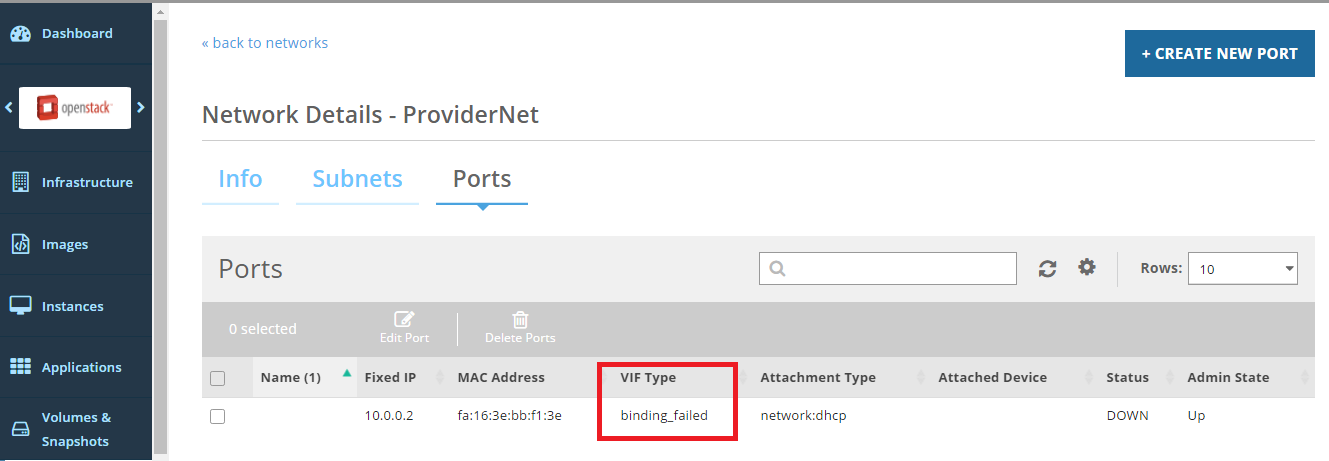
## Problem: Port Binding Fails
If you encounter an issue where ports are in the "VIF Binding Failed" state, isolate the problem and contact [Platform9 support](https://platform9.zendesk.com/hc/en-us).
Use the following steps to isolate the problem and contact Platform9 support for further troubleshooting.
* Check if all port bindings for the network have failed.
* Check if the port binding fails for all new VMs or a subset of Hypervisors.
* Check if the port binding fails for new VMs on one host only. If this problem exists, restart OVS agent by running the following command.
{% tabs %}
{% tab title="Bash" %}
```bash
service pf9-neutron-ovs-agent restart
```
{% endtab %}
{% endtabs %}
Then contact [Platform9 support](https://platform9.zendesk.com/hc/en-us)
---
# Agent Instructions
This documentation is published with GitBook. GitBook is the documentation platform designed so that both humans and AI agents can read, navigate, and reason over technical content effectively. Learn more at gitbook.com.
## Querying This Documentation
If you need additional information that is not directly available in this page, you can query the documentation by asking a question.
Perform an HTTP GET request on the following URL with the `ask` and `goal` query parameters:
```
GET https://docs.platform9.com/managed-openstack/5.8/troubleshooting/linux-kvm/troubleshooting-issues-networking.md?ask=&goal=
```
`ask` is the immediate question: it should be specific, self-contained, and written in natural language.
`goal` is what the user is ultimately trying to achieve, the reason they need the answer. Sharing it helps GitBook give you a better, more relevant answer. A goal is most helpful when it describes the outcome the user wants rather than restating the question. For example, with `ask=how do I create an API token`, a goal like `automate deployments from our CI pipeline` lets GitBook tailor the answer to that use case.
The response will contain a direct answer to the question and relevant excerpts and sources from the documentation.
Use this mechanism when the answer is not explicitly present in the current page, you need clarification or additional context, or you want to retrieve related documentation sections.