# Use vSphere Datastore as backing for Image Catalog
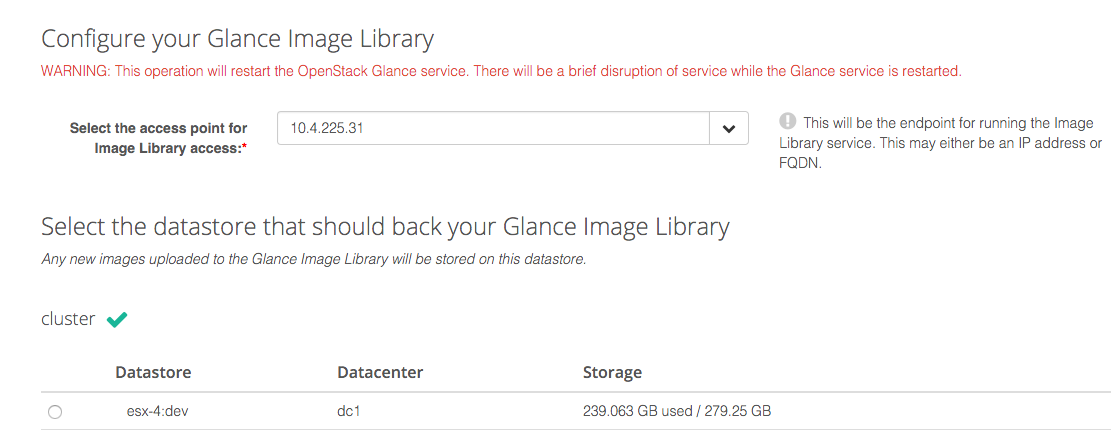
This Tutorial describes steps required for setting up a vSphere Datastore as a backing for your OpenStack Glance Image Catalog in Platform9 Managed OpenStack.
### Set Up OpenStack Glance:
* Enabling Glance datastore feature requires authorization of VMware gateway by specifying the datastore and appliance IP that should to be paired with Platform9 Glance.
* Exactly one datastore can be paired with Platform9 Glance.
* Any glance commands **must** be executed from a machine that can access the gateway.
### How it Works:
Once the initial setup is complete, all Glance operations will use the VMware datastore as the backend.
* Templates, however will be discovered based on the datastores paired with Nova.
* Image upload to the datastore is an HTTP PUT on the datastore directly and does not invoke any vCenter operation.
* Datastores paired with Nova Compute and Glance need not be the same.
* All glance images can be found at `/pf9/openstack_glance` path on the Glance datastore.
### Using OpenStack Glance Command Line:
Glance command line client can be used to perform image operations to datastores. Below are few examples.
* **Creating an image:** Two Platform9 specific properties need to be specified for the uploading the image, ie., pf9\_virtual\_size and pf9\_description. pf9\_virtual\_size is the virtual size of the image and pf9\_description is optional. Additionally, the property `vmware_ostype` should be specified correctly, especially for Windows OSes. You can refer to the list of supported VMware OS types [here](https://www.vmware.com/support/developer/vc-sdk/visdk2xpubs/ReferenceGuide/vim.vm.GuestOsDescriptor.GuestOsIdentifier.html). If you have more than one (1) region in your Platform9 deployment, you will also need to specify the region via the `--os-region-name` parameter.
{% tabs %}
{% tab title="OpenStack" %}
```bash
glance image-create \
[--os-region-name ] \
--name cirros \
--file /path/to/image/filename.vmdk \
--container-format=bare \
--disk-format=vmdk \
--property vmware_disktype="preallocated" \
--property vmware_adaptertype="ide" \
--property pf9_virtual_size="40894464" \
--property vmware_ostype="otherGuest64" \
--property pf9_description="glance cmdline image upload"
```
{% endtab %}
{% endtabs %}
**List Images**:
{% tabs %}
{% tab title="OpenStack" %}
```bash
glance image-delete
```
{% endtab %}
{% endtabs %}
**Display properties of an image**:
{% tabs %}
{% tab title="OpenStack" %}
```bash
glance image-delete
```
{% endtab %}
{% endtabs %}
**Delete image:**
{% tabs %}
{% tab title="OpenStack" %}
```bash
glance image-delete
```
{% endtab %}
{% endtabs %}