> For the complete documentation index, see [llms.txt](https://docs.platform9.com/llms.txt). Markdown versions of documentation pages are available by appending `.md` to page URLs; this page is available as [Markdown](https://docs.platform9.com/managed-kubernetes/support/troubleshooting/migrate-container-runtime-from-docker-to-containerd-during-upgrade.md).
# Migrate Container Runtime From Docker to Containerd During Upgrade
### Introduction
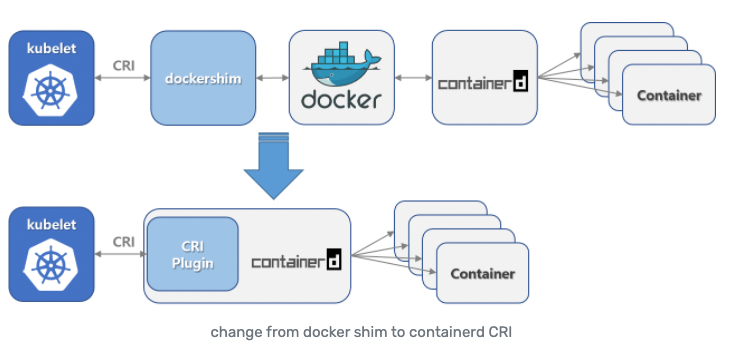
In this article, we discuss how to migrate an existing cluster's container runtime from Docker to containerd. Kubernetes is in the process of deprecating Dockershim as a container runtime. Kubernetes has scheduled the total depreciation and removal of Dockershim container runtime in [Kubernetes v1.24](https://github.com/kubernetes/enhancements/tree/master/keps/sig-node/2221-remove-dockershim). Docker format container images will continue to work in your cluster with all runtimes and do not need to be changed.
{% hint style="warning" %}
The runtime in use by an existing cluster can only be changed as part of a cluster upgrade.
Should you have any issues with migrating to containerd, [reach out to our support team](https://support.platform9.com/hc/en-us/requests/new?ticket_form_id=360000924873) for more information.
{% endhint %}
### Upgrade Requirements
The following requirements must be met before migrating a cluster from Docker to containerd.
#### Kubernetes Version
To migrate to containerd, the Kubernetes cluster must be running version 1.20 and upgrading to 1.21. Or running 1.21 and upgrading to any newer version, patch, or minor.
#### Ubuntu
There are no new requirements for Platform9 Managed Kubernetes clusters running on Ubuntu OS.
#### CentOS
We observed multiple issues when configuring devicemapper on CentOS with containerd. Due to these issues, Platform9 no longer supports devicemapper on CentOS for containerd.
The replacement of devicemapper is overlayfs which defaults to overlay2 (if available) with containerd on CentOS, similar to Ubuntu.
**Migrate from devicemapper to overlayfs**
To be able to migrate to overlayfs on CentOS, with following requirements must be met -
* kernel version >= 3.10.0-514
* If the underlying file system is xfs, then `d_type=true` must be enabled. To check if `d_type=true` is enabled, run the following command.
```
xfs_info
## If the output shows ftype=1 then d_type is enabled
SAMPLE OUTPUT
xfs_info /
meta-data=/dev/vda1 isize=512 agcount=51, agsize=524224 blks
= sectsz=512 attr=2, projid32bit=1
= crc=1 finobt=0 spinodes=0
data = bsize=4096 blocks=26214139, imaxpct=25
= sunit=0 swidth=0 blks
naming =version 2 bsize=4096 ascii-ci=0 ftype=1
log =internal bsize=4096 blocks=2560, version=2
= sectsz=512 sunit=0 blks, lazy-count=1
realtime =none extsz=4096 blocks=0, rtextents=0
```
To create a xfs file system with `d_type=true -` run the following command.
```
mkfs -t xfs -n ftype=1 /PATH/TO/DEVICE
```
{% hint style="info" %}
The XFS filesystems must be created with the `-n ftype=1` option enabled for use as an overlay. With the rootfs and any file systems created during system installation, set the *-*`-mkfsoptions=-n ftype=1` parameters in the Anaconda kickstart. When creating a new file system after the installation, run the command `mkfs -t xfs -n ftype=1 /PATH/TO/DEVICE`.
{% endhint %}
**Determine if an existing file system supports overlay**
To determine whether an existing file system is eligible for use as an overlay, run this command.
```
xfs_info /PATH/TO/DEVICE | grep ftype
```
This will show if the `ftype=1` option is enabled. See reference in [Chapter 21 in the File Systems Red Hat Enterprise Linux 7 | Red Hat Customer Portal](https://access.redhat.com/documentation/en-us/red_hat_enterprise_linux/7/html/7.2_release_notes/technology-preview-file_systems).
### Migrate to containerd
During a cluster upgrade, all containers are stopped, creating an opportunity at that point to change the container runtime. To migrate to containerd, you need to specify containerd as the container runtime during a cluster upgrade. The container runtime can *only* be changed for clusters running 1.20 upgrading to 1.21, or 1.21 clusters upgrading to 1.21.x and later.
#### Upgrade using the Web App
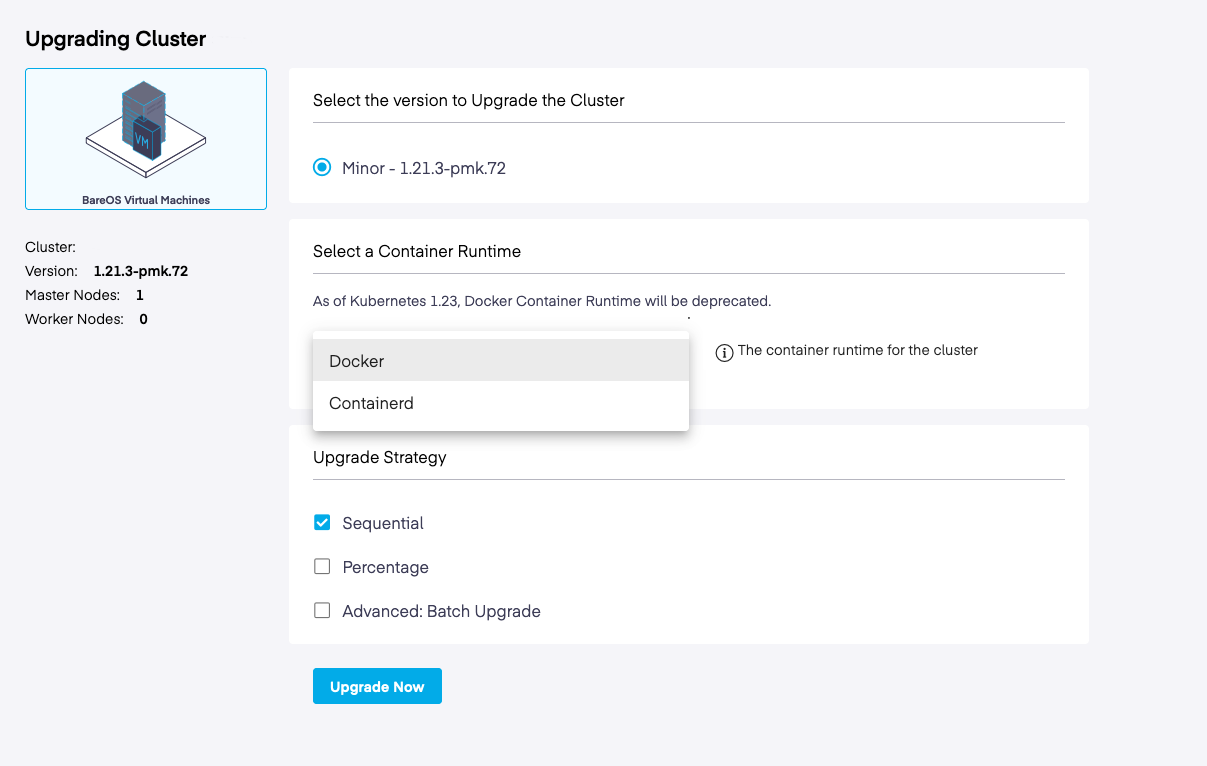
During the cluster upgrade process, eligible clusters (1.20 and newer) will display a new dropdown menu option to select containerd as the container runtime within the “Select a Container Runtime” card. To migrate, select the containerd option from the menu and then proceed as usual with the upgrade. During the cluster upgrade, all containers will be replaced with containers running within containerd.
#### API Upgrade
When upgrading the cluster using the upgrade API process, it allows passing the container runtime in the request body.
```
curl -X POST \
'https:///qbert/v4//clusters//upgrade?type=minor' \
-H 'Content-Type: application/json' \
-H 'X-Auth-Token: ' \
-H 'cache-control: no-cache' \
-d '{
"containerRuntime": "containerd"
}'
```
{% hint style="warning" %}
The update can only be run as part of a cluster upgrade. This runtime will fail if an attempt is made to modify the container runtime via the *edit cluster API*. Additionally, we do not support migrating the runtime from containerd back to docker.
{% endhint %}
### Backward Com
### Backward Compatibility
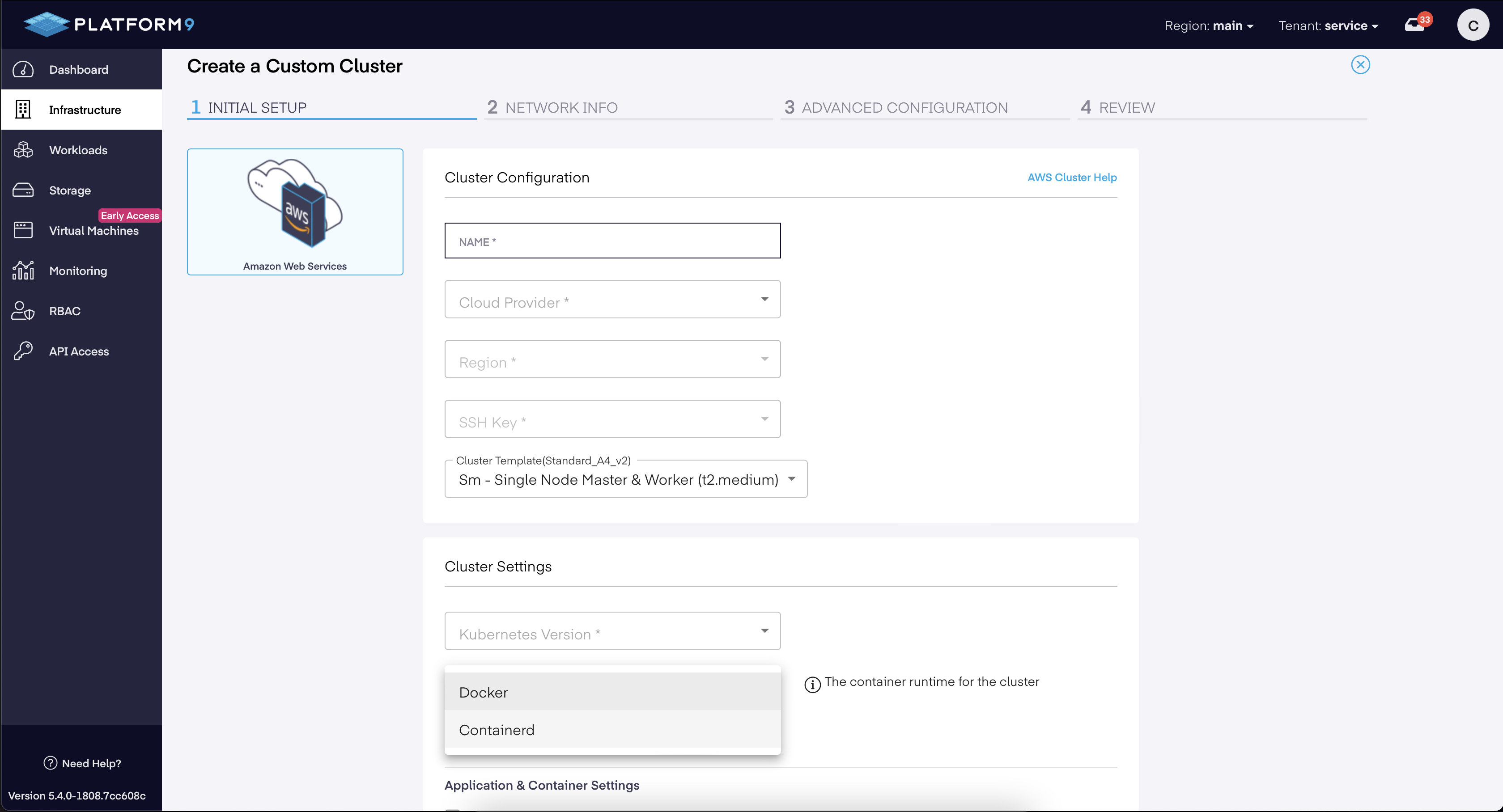
Docker will remain the default container runtime until 1.23. When creating a new cluster, users can choose the type of container runtime to be used.
---
# Agent Instructions
This documentation is published with GitBook. GitBook is the documentation platform designed so that both humans and AI agents can read, navigate, and reason over technical content effectively. Learn more at gitbook.com.
## Querying This Documentation
If you need additional information that is not directly available in this page, you can query the documentation by asking a question.
Perform an HTTP GET request on the following URL with the `ask` and `goal` query parameters:
```
GET https://docs.platform9.com/managed-kubernetes/support/troubleshooting/migrate-container-runtime-from-docker-to-containerd-during-upgrade.md?ask=&goal=
```
`ask` is the immediate question: it should be specific, self-contained, and written in natural language.
`goal` is what the user is ultimately trying to achieve, the reason they need the answer. Sharing it helps GitBook give you a better, more relevant answer. A goal is most helpful when it describes the outcome the user wants rather than restating the question. For example, with `ask=how do I create an API token`, a goal like `automate deployments from our CI pipeline` lets GitBook tailor the answer to that use case.
The response will contain a direct answer to the question and relevant excerpts and sources from the documentation.
Use this mechanism when the answer is not explicitly present in the current page, you need clarification or additional context, or you want to retrieve related documentation sections.