> For the complete documentation index, see [llms.txt](https://docs.platform9.com/llms.txt). Markdown versions of documentation pages are available by appending `.md` to page URLs; this page is available as [Markdown](https://docs.platform9.com/managed-kubernetes/5.8/getting-started/pmk-navigation.md).
# Pmk Navigation
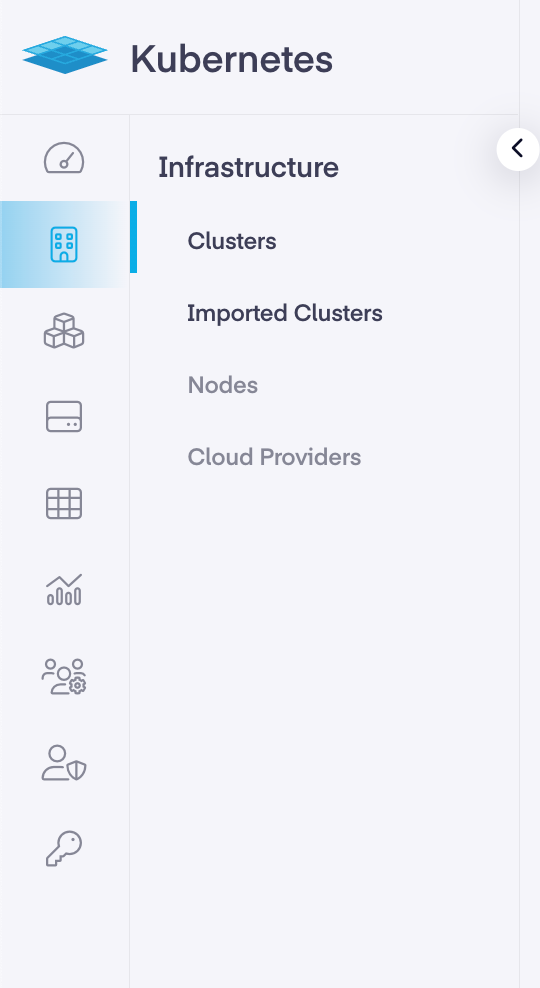
In the PMK dashboard, there are multiple tabs down the left-hand side that provide access to its multiple features and function. Below is a brief description of each tab and the information available within it.
* Dashboard – Details an overview of clusters, nodes, and cloud accounts. It also displays the region, tenant, notifications, user account, and admin settings.
* Infrastructure – The infrastructure page provides the number of clusters, imported clusters, nodes, and cloud providers as well as a wealth of information on each.
* Workloads – This page displays pods, deployments, services, namespaces in addition to further specific insight about their capabilities.
* Storage – The storage page outlines the storage classes, persistent volumes, persistent volume claims, CSI drivers, storage providers and their associated details.
* Virtual Machines – This section details the KubeVirt components which make it possible for virtual machines to be managed by Kubernetes.
* Apps – This page show the app catalog, deployed apps, repositories, and the information related to them.
* Cluster Profiles – This page provides info on RBAC profiles, drift analytics, and the data associated with the current Roles, ClusterRoles, RoleBindings, and ClusterRoleBindings.
* Monitoring – The monitoring page shows an overview of the alarms, rules, and any notices available. It also provides links to Grafana and cluster details.
* RBAC – The RBAC page displays the current Roles, ClusterRoles, RoleBindings, and ClusterRoleBindings and their links components. It also allows for editing and deletions of those components, as well as the ability to add/remove verbs to a resource.
* API Access – The API access page features API services, kubeconfig, and terraform related access info needed to programmatically interact with PMK.
---
# Agent Instructions
This documentation is published with GitBook. GitBook is the documentation platform designed so that both humans and AI agents can read, navigate, and reason over technical content effectively. Learn more at gitbook.com.
## Querying This Documentation
If you need additional information that is not directly available in this page, you can query the documentation dynamically by asking a question.
Perform an HTTP GET request on the current page URL with the `ask` query parameter, and the optional `goal` query parameter:
```
GET https://docs.platform9.com/managed-kubernetes/5.8/getting-started/pmk-navigation.md?ask=&goal=
```
`ask` is the immediate question: it should be specific, self-contained, and written in natural language.
`goal` is optional and describes the broader end goal you are ultimately trying to accomplish on behalf of the user. GitBook uses it to tailor the answer towards what is most useful for that goal.
The response will contain a direct answer to the question and relevant excerpts and sources from the documentation.
Use this mechanism when the answer is not explicitly present in the current page, you need clarification or additional context, or you want to retrieve related documentation sections.