> For the complete documentation index, see [llms.txt](https://docs.platform9.com/llms.txt). Markdown versions of documentation pages are available by appending `.md` to page URLs; this page is available as [Markdown](https://docs.platform9.com/managed-kubernetes/5.15/clusters/infrastructure-dashboard-overview/cluster-alarms.md).
# Cluster Alarms
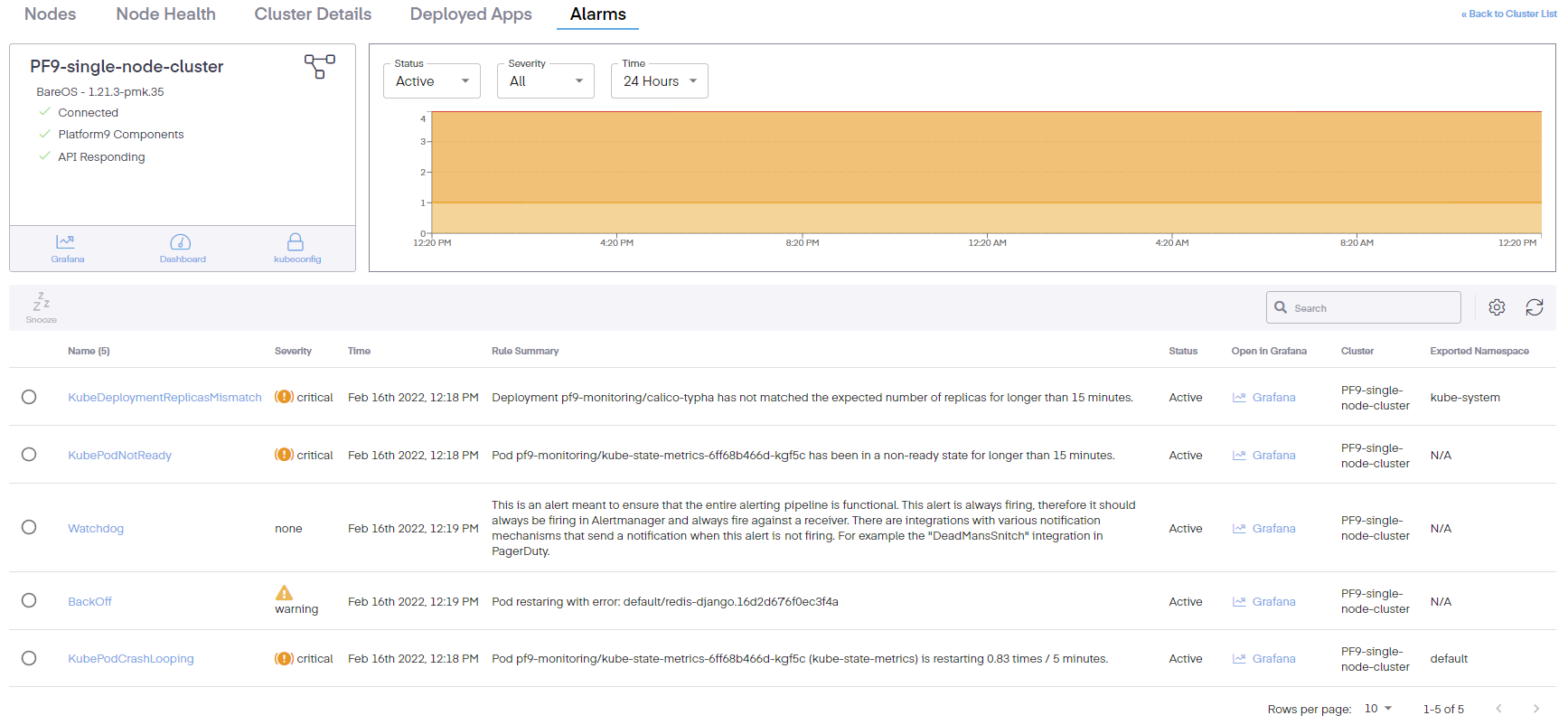
There are two methods to view the alarms, the first is to go to *Infrastructure* > *Clusters* and then click the radio button next to the cluster name, then click *Details*. The second is to click the link on the cluster name. This opens a new window where we can now see the Alarms tab. It shows Kubernetes monitoring, alarm visibility and a clear understanding of what is happening inside a Kubernetes cluster and its associated applications.
Initially, we see the name of the cluster, the type of cluster, connection status of the nodes in the cluster, whether the Platform9 components are healthy, and if the API server is responding for all nodes. Additionally, it provides links to Grafana, the kubernetes dashboard and the kubeconfig download config. Moreover, a graphical overview of the alarms is seen, which provides a bird's-eye view of events. Clicking on the dropdown tabs shows the status of the alarm (All, Active, Suppressed, or Closed), the severity (Warning, Critical, or Fatal), and the overall timeframe of the alarms.
The columns can also be edited to include the following information.
* Fingerprint – A unique alert identifier
* Name – The name of the rule
* Severity – The gravity of the issue
* Time – Then the issue began
* Rule Summary – a short abstract or synopsis of the issue
* Status – Shows the current condition of the issue
* Open in Grafana – Provides a link to the Grafana dashboard to view the issue in that interface
* Cluster – Defines the cluster where the issue occurred
* Exported Namespace – The namespace where the event occurred
* Starts At – The beginning time of the incident
* Ends At – The ending time of the incident
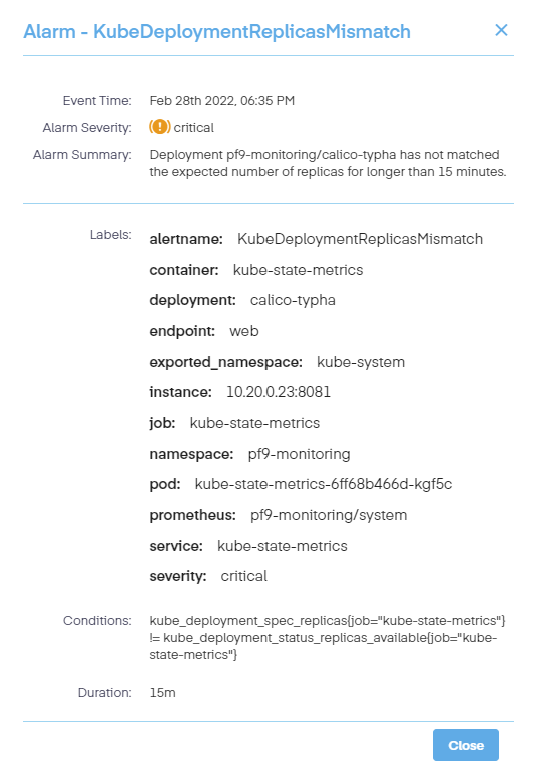
Clicking on an individual alarm bring up a new pop-up pane which details even more info.
These details include the following information.
* The name of the alarm
* Its severity
* A short summary of the alert issue
* Any labels that are applied
* The conditions of the alarm
* The length of time or duration of the event
---
# Agent Instructions
This documentation is published with GitBook. GitBook is the documentation platform designed so that both humans and AI agents can read, navigate, and reason over technical content effectively. Learn more at gitbook.com.
## Querying This Documentation
If you need additional information that is not directly available in this page, you can query the documentation by asking a question.
Perform an HTTP GET request on the following URL with the `ask` and `goal` query parameters:
```
GET https://docs.platform9.com/managed-kubernetes/5.15/clusters/infrastructure-dashboard-overview/cluster-alarms.md?ask=&goal=
```
`ask` is the immediate question: it should be specific, self-contained, and written in natural language.
`goal` is what the user is ultimately trying to achieve, the reason they need the answer. Sharing it helps GitBook give you a better, more relevant answer. A goal is most helpful when it describes the outcome the user wants rather than restating the question. For example, with `ask=how do I create an API token`, a goal like `automate deployments from our CI pipeline` lets GitBook tailor the answer to that use case.
The response will contain a direct answer to the question and relevant excerpts and sources from the documentation.
Use this mechanism when the answer is not explicitly present in the current page, you need clarification or additional context, or you want to retrieve related documentation sections.