> For the complete documentation index, see [llms.txt](https://docs.platform9.com/llms.txt). Markdown versions of documentation pages are available by appending `.md` to page URLs; this page is available as [Markdown](https://docs.platform9.com/managed-kubernetes/5.14/platform-administration/security/docker-bench-security-script.md).
# Docker Bench Security Script
## What is Docker-bench?
The **Docker-bench for Security** tool is an open-source script which analyzes numerous standard best-practices when deploying Docker containers in a production environment. The fully automated tests are designed to locate issues with your configuration based on the [CIS Docker Benchmark v1.3.1](https://www.cisecurity.org/benchmark/docker/) standards. These tests are fully automated and allow users to self-assess the hosts and the docker containers where they reside.
## Prerequisites
* A running instance of Docker on your server
* An administrative user with elevated permissions or a user associated with the docker group
* Docker 1.13.0≥ (If a distribution does not utilize *auditctl*, the included audit tests will check the */etc/audit/audit.rules* file to see if a rule is present instead)
## Installation
There are two methods to install and run Docker bench. The primary method is to use the *git clone* command to replicate the script locally, and the second is to run a containerized version of the script.
### Clone
Run the `git clone` command to replicate the script. Once it is downloaded, *cd* into the cloned folder and run the script.
{% tabs %}
{% tab title="Bash" %}
```bash
git clone https://github.com/docker/docker-bench-security.git
cd docker-bench-security
sudo sh docker-bench-security.sh
```
{% endtab %}
{% endtabs %}
{% tabs %}
{% tab title="Bash" %}
```bash
docker run --rm --net host --pid host --userns host --cap-add audit_control \
-e DOCKER_CONTENT_TRUST=$DOCKER_CONTENT_TRUST \
-v /etc:/etc:ro \
-v /usr/bin/containerd:/usr/bin/containerd:ro \
-v /usr/bin/runc:/usr/bin/runc:ro \
-v /usr/lib/systemd:/usr/lib/systemd:ro \
-v /var/lib:/var/lib:ro \
-v /var/run/docker.sock:/var/run/docker.sock:ro \
--label docker_bench_security \
docker/docker-bench-security
```
{% endtab %}
{% endtabs %}
### Docker Container
{% hint style="warning" %}
**Warning**
The containerized docker script requires elevated privilege to run since it employs the host's filesystem, pid and network namespaces because components of the benchmark will apply to the running host.
{% endhint %}
The second method to run the script uses a small, prepackaged docker container. This is the easiest way to run Docker Bench against your hosts. Adjusting the shared volumes is also required depending on the OS where the script is run[\*](https://github.com/docker/docker-bench-security#run-with-docker).
### Building the Docker Image
Users have two choices when creating the docker image, using git clone or docker composed. Both methods are noted below.
{% tabs %}
{% tab title="Bash" %}
```bash
git clone https://github.com/docker/docker-bench-security.git
cd docker-bench-security
docker build --no-cache -t docker-bench-security .
```
{% endtab %}
{% endtabs %}
{% tabs %}
{% tab title="Bash" %}
```bash
git clone https://github.com/docker/docker-bench-security.git
cd docker-bench-security
docker-compose run --rm docker-bench-security
```
{% endtab %}
{% endtabs %}
## Running the Script
{% tabs %}
{% tab title="Bash" %}
```bash
sh docker-bench-security.sh
```
{% endtab %}
{% endtabs %}
### Script Options
{% tabs %}
{% tab title="Bash" %}
```bash
docker-bench-security.sh -h
-b optional Do not print colors
-h optional Print this help message
-l FILE optional Log output in FILE, inside container if run using docker
-u USERS optional Comma delimited list of trusted docker user(s)
-c CHECK optional Comma delimited list of specific check(s) id
-e CHECK optional Comma delimited list of specific check(s) id to exclude
-i INCLUDE optional Comma delimited list of patterns within a container or image name to check
-x EXCLUDE optional Comma delimited list of patterns within a container or image name to exclude from check
-n LIMIT optional In JSON output, when reporting lists of items (containers, images, etc.), limit the number of reported items to LIMIT. Default 0 (no limit).
-p PRINT optional Disable the printing of remediation measures. Default: print remediation measures.
```
{% endtab %}
{% endtabs %}
By default, Docker Bench will run all available CIS tests. This will produce two main logs within a log folder in the current directory. Below are the log names.
* *docker-bench-security.sh.log.json*
* *docker-bench-security.sh.log.*
When the docker container is used, the log files will be created inside the container in location */usr/local/bin/log/*. If users wish to access them from the host after the container has been run, a mounted storage volume is required.
## Results
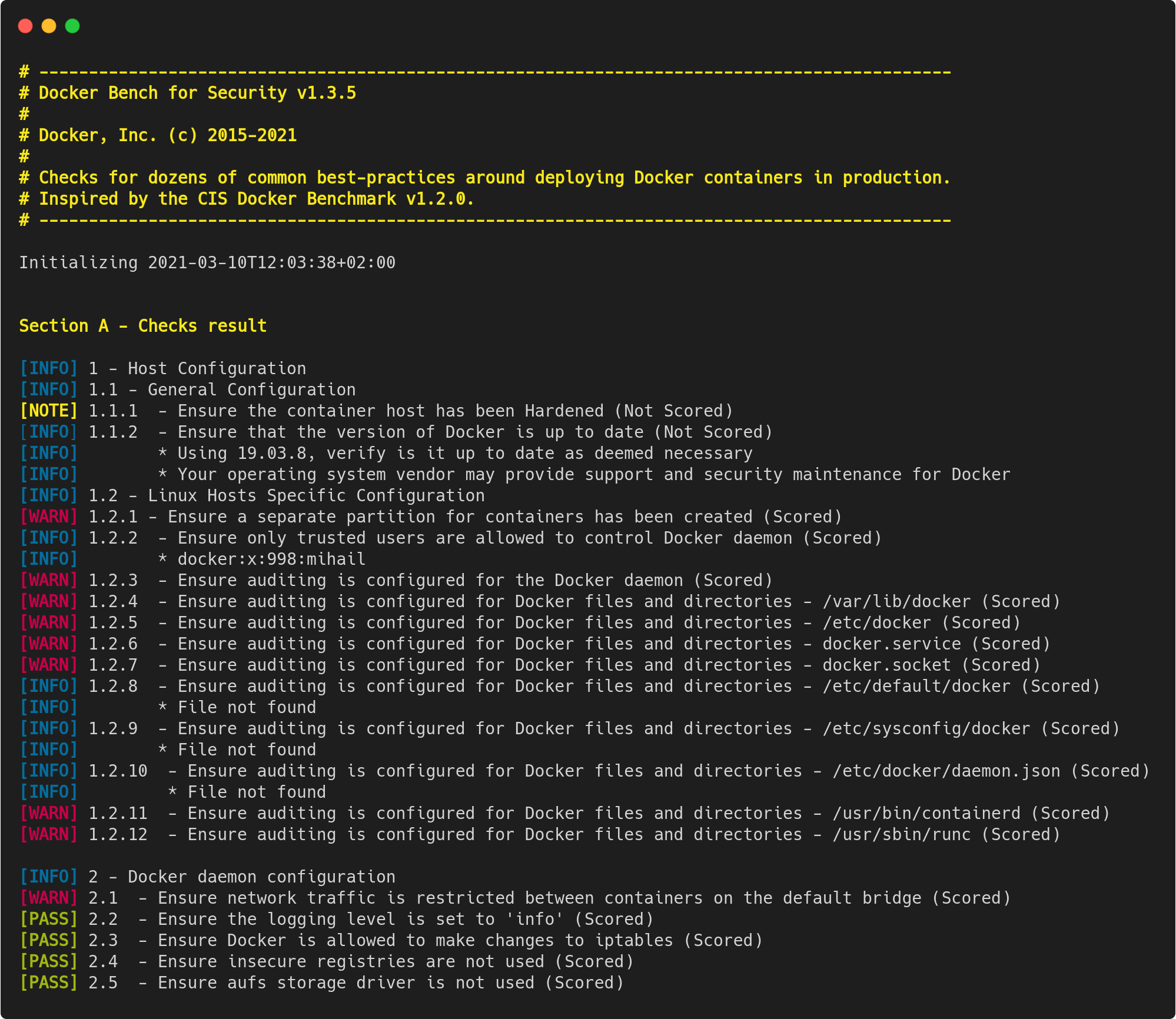
The output of the script is broken down into five main areas. Each section address a different area of concern.
* Host Configuration
* Docker Daemon Configuration
* Docker Daemon Configuration Files
* Container Images and Build Files
* Container Runtime
In each of these areas, the tests will return one of three outcomes; Info, Warning, or Pass.
After each check, feedback is provided for each of the configuration recommendations. In these findings, users can leverage the original benchmark document to remedy any issues. Additional testing options can be found on the related [GitHub page](https://github.com/docker/docker-bench-security#docker-bench-for-security-options).
---
# Agent Instructions
This documentation is published with GitBook. GitBook is the documentation platform designed so that both humans and AI agents can read, navigate, and reason over technical content effectively. Learn more at gitbook.com.
## Querying This Documentation
If you need additional information that is not directly available in this page, you can query the documentation by asking a question.
Perform an HTTP GET request on the following URL with the `ask` and `goal` query parameters:
```
GET https://docs.platform9.com/managed-kubernetes/5.14/platform-administration/security/docker-bench-security-script.md?ask=&goal=
```
`ask` is the immediate question: it should be specific, self-contained, and written in natural language.
`goal` is what the user is ultimately trying to achieve, the reason they need the answer. Sharing it helps GitBook give you a better, more relevant answer. A goal is most helpful when it describes the outcome the user wants rather than restating the question. For example, with `ask=how do I create an API token`, a goal like `automate deployments from our CI pipeline` lets GitBook tailor the answer to that use case.
The response will contain a direct answer to the question and relevant excerpts and sources from the documentation.
Use this mechanism when the answer is not explicitly present in the current page, you need clarification or additional context, or you want to retrieve related documentation sections.